
 August 25, 2026
Search engine optimization is no longer just about adding keywords, earning backlinks, and publishing more pages. Today, the quality of a visitor’s experience plays a major role in whether a website can attract, engage, and retain its audience.
That is where user experience becomes an essential part of a modern SEO strategy. When visitors can quickly find information, navigate without frustration, and complete actions easily, they are more likely to stay engaged. Those positive signals can support stronger search performance over time.
This guide explains how UX and SEO connect, what makes a website experience search-friendly, and what businesses can do to build pages that work better for both people and search engines.
Key Takeaways
- A better website experience can improve engagement, trust, and conversion potential.
- Site speed, mobile usability, navigation, and content structure all support stronger search performance.
- Good design should help visitors complete tasks quickly rather than simply make pages look attractive.
- SEO and usability work best when they are planned together from the beginning.
What Is UX and Why Does It Matter for SEO?
UX refers to the overall experience someone has while interacting with a website, app, or digital product. It includes everything from page speed and navigation to readability, accessibility, and how easy it is to complete a desired action.
In SEO, the goal is not simply to bring more visitors to a page. The goal is to attract the right audience and provide an experience that meets their expectations after they arrive.
For example, imagine someone searches for a service, clicks a result, and lands on a slow page filled with cluttered menus and difficult-to-read content. Even if the page technically answers the search query, the visitor may leave before finding what they need.
A well-designed page takes the opposite approach. It makes information easy to scan, creates clear paths through the site, and removes unnecessary obstacles.
This is why seo user experience should be treated as a connected strategy rather than two separate areas of digital marketing.
How User Experience and SEO Work Together
Search engines aim to recommend useful, relevant pages. A website that makes it difficult for visitors to access information creates a poor experience, regardless of how well optimized its metadata may be.
Good usability supports SEO in several important ways.
Faster Pages Create Better First Impressions
Speed is one of the first things visitors notice, even if they never consciously think about it. A slow-loading page can create frustration before a visitor reads a single sentence.
Large images, unnecessary scripts, poorly optimized code, and overloaded plugins can all affect performance. Improving these areas helps create a smoother browsing experience.
Interaction speed matters as well. Website owners using WordPress can explore practical guidance on how to improve inp for wordpress and boost user experience, especially when visitors experience delays while interacting with buttons, forms, or other page elements.
A fast site does more than improve technical performance. It helps visitors move naturally from one action to the next.
Clear Navigation Helps Visitors and Search Engines
Navigation should answer a simple question: where should the visitor go next?
When menus are overloaded or important pages are buried several clicks deep, users may struggle to find what they need. A logical site structure makes browsing easier and also helps search engines understand relationships between pages.
Use clear menu labels, meaningful internal links, and organized categories. Important pages should be easy to reach without forcing visitors to search through unnecessary layers.
Simple navigation also encourages people to explore more of the site, which can create stronger engagement.
Why Good UX Design Reduces Friction
The best websites make complex tasks feel simple. Visitors should not have to guess where to click, what a button does, or how to complete a form.
Effective ux design focuses on removing friction at every important stage of the visitor journey.
This can include:
- Using clear calls to action
- Keeping forms short and easy to complete
- Creating readable page layouts
- Making buttons easy to identify
- Using consistent design patterns
- Reducing unnecessary pop-ups and distractions
The objective is not to add more visual elements. It is to help visitors accomplish what they came to do.
Businesses looking for professional support can benefit from unlimited web design, particularly when they need ongoing improvements instead of treating their website as a one-time project.
Content Structure Is Part of the Experience
Great content can still perform poorly if it is difficult to read.
Large blocks of text, unclear headings, tiny fonts, and inconsistent formatting create unnecessary barriers. Visitors often scan before deciding whether to invest time in reading an entire page.
A search-friendly page should make important information easy to discover.
Use Headings to Guide the Reader
Headings create a clear structure for both readers and search engines. They help visitors quickly identify the sections most relevant to their needs.
A logical heading hierarchy also improves content organization. Each section should focus on one clear idea and flow naturally into the next.
Make Important Information Easy to Scan
Short paragraphs, descriptive subheadings, bullet points, and clear spacing can make a page easier to consume.
This does not mean every page should be simplified to the point of losing depth. Instead, complex information should be presented in a way that feels approachable.
The goal of user experience design is to make useful information easier to access, understand, and act upon.
Mobile Experience Is No Longer Optional
A large share of web traffic comes from mobile devices, which means websites must work well on smaller screens.
A page that looks polished on a desktop but becomes difficult to navigate on a phone creates an immediate problem.
Common mobile issues include:
- Buttons placed too close together
- Text that requires zooming
- Horizontal scrolling
- Large pop-ups covering the screen
- Slow-loading media
- Complicated navigation menus
Mobile-friendly design should be considered throughout the entire development process.
Responsive layouts, readable typography, touch-friendly controls, and optimized media all contribute to a stronger experience.
Page Experience Builds Trust and Credibility
Visitors make quick judgments about whether they trust a website.
Outdated layouts, broken links, confusing navigation, and inconsistent branding can make a business appear less reliable. On the other hand, a clean and functional site can make visitors feel more comfortable exploring the content or taking the next step.
Trust is especially important for websites that collect information, generate leads, or process transactions.
A strong user experience design agency looks beyond visual appearance and considers how every part of the website affects confidence, usability, and decision-making.
Consistency also matters. Fonts, buttons, colors, messaging, and interactions should feel connected across the site. Visitors should never feel as if they have moved to an entirely different website after clicking an internal link.
UX Can Support Better Engagement Metrics
Search rankings are influenced by many factors, and engagement data should not be treated as a single direct ranking formula. However, a better experience can create behaviors that indicate visitors are finding the site useful.
For example, a well-organized page may encourage users to:
- Spend more time exploring content
- Visit related pages
- Complete forms or purchases
- Return to the website later
- Share useful resources
The key is to focus on genuine value rather than trying to manipulate individual metrics.
A website should answer the searcher’s question efficiently and then provide logical next steps.
For practical ideas, exploring proven UI/UX secrets can help businesses identify the small design decisions that often influence whether visitors continue or leave.
Accessibility Improves the Experience for More Users
Accessibility is an important part of building a website that works for a wider audience.
Helpful practices include using sufficient color contrast, descriptive image text, logical heading structures, readable typography, and keyboard-friendly navigation.
Accessibility improvements can also make content easier for search engines and assistive technologies to interpret.
The goal should be to remove unnecessary barriers so more people can access and use the website effectively.
Why SEO and Design Should Be Planned Together
One common mistake is treating SEO as something added after a website has already been designed.
This approach can create unnecessary problems. Important content may not have enough space, navigation may be difficult to restructure, and technical improvements may require significant changes later.
A better approach is to plan search strategy and design together.
Understanding how seo and design work together to build brand authority can help businesses create websites that are visually strong while still supporting discoverability and long-term growth.
This collaboration should include keyword research, content planning, site architecture, technical performance, and conversion paths from the beginning.
How to Improve UX Without Redesigning Your Entire Website
A complete redesign is not always necessary. Small improvements can make a meaningful difference when they address real points of friction.
Start by reviewing the pages that receive the most traffic or generate the most leads.
Simplify Important Pages
Look for unnecessary elements that distract from the main purpose of the page.
Remove redundant copy, limit competing calls to action, and make the next step obvious.
Improve Readability
Review font sizes, paragraph length, spacing, and heading structure.
Visitors should be able to understand the main message without working through dense, poorly organized content.
Review Internal Navigation
Check whether visitors can easily move from one relevant page to another.
Contextual internal links can guide users toward helpful information while supporting a stronger overall site structure.
Test the Mobile Experience
Open key pages on different screen sizes and complete the same actions a visitor would take.
Pay attention to forms, menus, buttons, images, and loading speed.
Use Real Visitor Feedback
Analytics, heatmaps, user testing, customer questions, and support requests can reveal problems that are not obvious from inside the business.
The best improvements are usually based on evidence rather than assumptions.
The Role of UX in E-Commerce SEO
For an online store, the experience can directly affect whether visitors complete a purchase.
Product discovery, search functionality, filtering, product information, checkout design, and page speed all influence the buying journey.
Customer reviews and authentic contributions can also improve trust. Businesses exploring e-commerce growth with user-generated content can use customer-created material to add credibility while making product pages more useful.
The easier it is for customers to compare options, understand products, and complete a purchase, the stronger the overall experience can become.
A Practical User Experience and SEO Checklist
Before publishing or updating an important page, review the following areas:
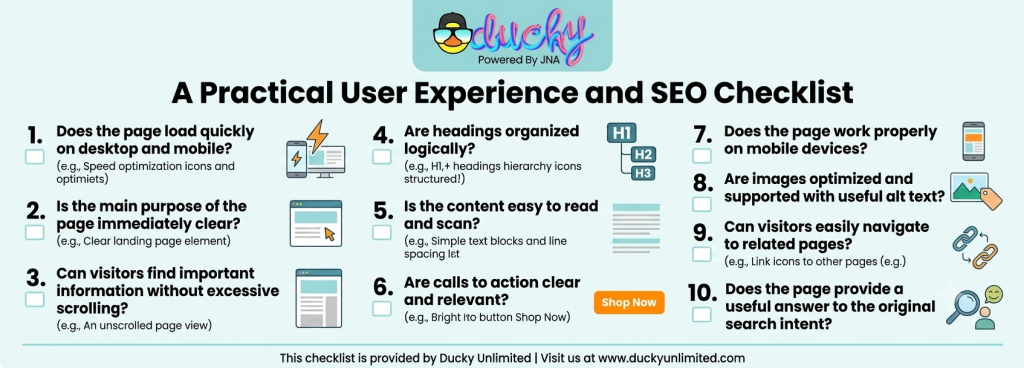
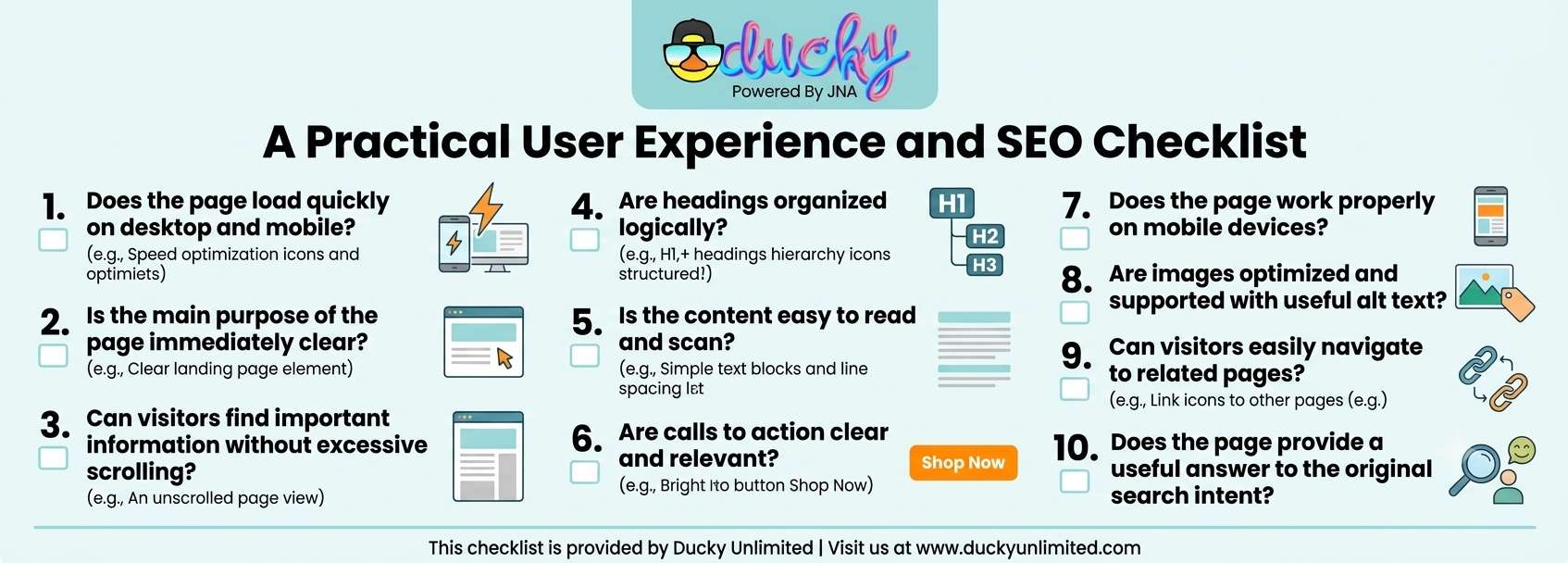
A regular user experience and seo checklist helps teams identify recurring problems before they affect visitors and performance.
Choosing the Right Approach for Ongoing Improvements
Website optimization should not end when a redesign launches.
Visitor expectations change, technology evolves, and new content creates additional navigation and performance challenges. Regular reviews help businesses identify areas where the experience can be improved.
Professional user experience design services can be particularly valuable when a website has growing traffic, multiple conversion paths, or complex content structures that require ongoing refinement.
The best approach combines design, technical performance, content quality, and search strategy instead of improving each area in isolation.
Final Thoughts
SEO can bring visitors to a website, but the experience determines what happens next.
A fast, clear, accessible, and easy-to-use website gives visitors more reasons to stay, explore, and take action. Over time, those improvements can support stronger engagement, better conversions, and a healthier search presence.
The most effective strategy is to stop viewing SEO and usability as separate tasks. Build pages around what people need, make those pages easy to use, and ensure search engines can clearly understand the value they provide.
When usability becomes part of the optimization process, businesses can create digital experiences that are built for both visibility and real people.
Frequently Asked Questions
Does UX affect SEO?
Yes, good usability can support stronger engagement, accessibility, performance, and overall search visibility.
What is the most important UX factor for SEO?
Fast loading, clear navigation, mobile usability, and helpful content all play important roles.
Can a website rank well with poor design?
It may rank for some queries, but poor usability can limit engagement, trust, and conversions.
How often should I review my website experience?
Review key pages regularly and after major design, content, or technical changes.
Is mobile UX important for search rankings?
Yes, mobile usability is essential because search engines and users increasingly evaluate websites on mobile experiences.