
 August 12, 2026
Vibe coding has changed how founders, marketers, designers, and developers approach software creation. Instead of writing every line manually, people can describe an idea in natural language and use AI-assisted systems to turn it into working code. But with so many options available, choosing the right platform can feel confusing.
Key Takeaway
- The best platforms reduce the gap between an idea and a usable product.
- Different tools suit prototypes, websites, internal apps, and production projects.
- Good results still depend on clear prompts, testing, and human review.
- The right platform should match your technical skill, project scope, and budget.
What Is Vibe Coding?
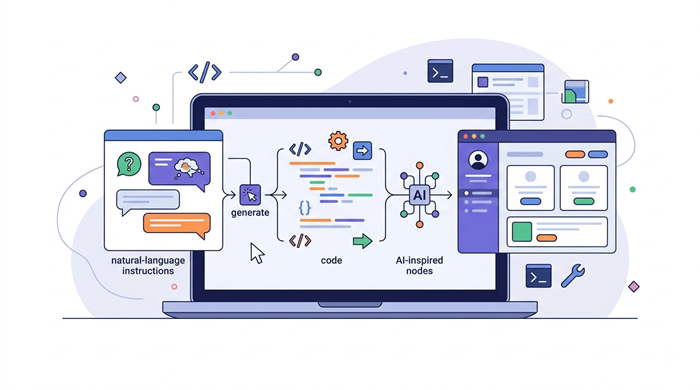
The vibe coding meaning is simple: you explain what you want to build in natural language, while AI generates or modifies the code needed to create it. The approach became popular because it lets people focus more on product ideas and less on repetitive implementation.
A practical vibe coding definition is therefore AI-assisted software development driven by conversational instructions. For many teams, vibe coding tools provide the fastest route from a rough concept to a testable experience. You can ask for a landing page, dashboard, feature, database workflow, or interface, then refine the result through additional prompts.
The appeal is not that coding has disappeared. AI handles much of the first draft while people guide the outcome and correct problems.
How Vibe Coding Tools Work
Most AI development platforms follow a similar workflow. You describe the desired result, the AI generates code, you preview it, and then you ask for changes.
For example, a founder might request a customer portal with sign-in, a dashboard, and a simple billing area. The system can create an initial version and continue adjusting it based on feedback.
Some AI development platforms work directly in a browser, while others integrate AI into a traditional development environment. Advanced developers may want more control over files, dependencies, Git workflows, and deployment.
What Makes the Best Vibe Coding Tools?
Before comparing options, it helps to know what to look for.
Ease of Use
A strong platform should make it easy to move from a plain-language idea to a working prototype.
Quality of Generated Code
Speed is useful only when the output is maintainable. Look for tools that produce organized code, explain changes, and make it easy to inspect what the AI has created. Good vibe coding tools should also make it simple to undo or refine AI-generated changes.
Debugging and Iteration
AI-generated projects rarely work perfectly on the first attempt. The best platforms make debugging conversational, so you can report an error and ask for a targeted fix without rebuilding everything.
Integrations and Deployment
A useful platform should connect with databases, APIs, authentication, version control, and hosting when your project requires them. Deployment options also matter once a prototype needs to become a real product.
Security and Control
For business projects, consider data handling, access controls, and code review.
Best Vibe Coding Tools to Consider
There is no single winner for every project. The right choice depends on whether you need a quick prototype, a polished website, or a more developer-controlled application.
1. Replit
Replit is a strong choice for people who want an accessible browser-based development environment with AI assistance. It combines coding, project management, collaboration, and deployment in one place.
Among vibe coding tools, its browser-first approach is especially convenient for quick experiments.
2. Cursor
Cursor is aimed more directly at developers who want AI deeply integrated into their coding workflow. Its editor can understand a codebase, generate changes, explain files, and help troubleshoot problems.
For teams already comfortable with development environments, it offers more control than a purely visual builder.
3. Lovable
Lovable is designed around describing an application and rapidly generating a working interface. It is especially appealing to founders, product teams, and non-developers who want to validate an idea quickly.
4. Bolt
Bolt focuses on rapid web application creation through natural-language prompts. It is useful when you want to experiment with a concept, generate a front end, and iterate quickly.
5. v0
v0 is particularly useful for generating modern interface concepts and React-based components from descriptions. Designers and developers can use it to explore layouts, UI patterns, and application screens before investing heavily in implementation.
Its value is strongest when interface quality and speed are important parts of the workflow.
Choosing Vibe Coding Platforms for Your Project
Start with your goal rather than the feature list.
If you are validating a startup idea, prioritize speed and visual iteration. If you are building a customer-facing product, pay more attention to code quality, integrations, testing, and deployment.

For teams with developers, an AI-enhanced editor may provide the right balance between automation and control. In that setting, vibe coding tools can reduce repetitive work without removing access to the underlying project files. For non-technical users, a prompt-first builder can reduce the barrier to getting a prototype online.
From Prototype to Real Product
One of the biggest advantages of vibe coding is the ability to move quickly from an idea to something tangible. However, a prototype is not automatically production-ready.
If your project starts as an experiment, you may eventually need authentication, error handling, performance optimization, accessibility, testing, backups, and security reviews.
That transition is where experienced development support becomes valuable. Businesses that want to move beyond experimentation can explore unlimited web design when they need ongoing website design and development support.
Founders can also learn more about from vibe coding to reality when turning an AI-generated concept into a more practical product.
How Marketers Can Use Vibe Coding
Marketing teams can use AI-assisted development to test landing pages, calculators, campaign concepts, interactive tools, and lightweight customer experiences without waiting for a full development cycle.
Understanding how vibe coding helps marketers test ideas faster can help marketing teams decide which experiments are worth developing further.
Building Better Websites With Modern Tools
AI-assisted development is only one part of today’s web workflow. Teams also need frameworks, design systems, analytics, testing tools, hosting services, and content management solutions.
A useful overview of popular web development tools and software can help you understand how AI fits into a broader development stack.
The best platforms become more effective when they are paired with a clear process. Define the user problem, build a focused version, test it, collect feedback, and improve the product based on evidence.
Can Vibe Coding Reduce Development Costs?
It can, particularly during early discovery and prototyping. Teams can test multiple concepts before committing significant engineering time, while developers can automate repetitive tasks and focus on more complex decisions.
The guide on how unlimited web design saves businesses money explains why reducing friction in website development can matter financially.
Using AI Without Losing Human Oversight
The strongest workflow treats AI as a development assistant rather than an unquestioned authority. Even the best vibe coding tools need clear requirements and careful human review. Review generated code, test important functions, verify dependencies, and protect sensitive information.
This is especially important for applications that handle payments, personal data, business records, or critical workflows. Human judgment remains essential even when AI handles much of the implementation.
The same principle applies to customer-facing experiences. Technology should support a clear customer journey, and teams can explore building customer loyalty with digital engagement strategies to connect digital experiences with longer-term engagement.
Use AI to accelerate the work, but keep people responsible for architecture, testing, security, accessibility, and product decisions. Used this way, vibe coding tools become a practical accelerator rather than a substitute for sound development judgment.
Final Thoughts
The best platforms are not necessarily the ones with the longest feature lists. For many projects, vibe coding tools are valuable because they shorten the distance between an idea and a useful result.
Replit, Cursor, Lovable, Bolt, and v0 each approach AI-assisted development differently. Your choice should depend on your technical experience, project complexity, collaboration needs, and plans for deployment.
Use AI to accelerate the work, but keep people responsible for architecture, testing, security, accessibility, and product decisions. That balance is what turns fast experimentation into software people can actually rely on.
FAQs
What is vibe coding?
Vibe coding is an AI-assisted approach where people describe software requirements in natural language and AI generates or changes code.
Are these tools suitable for beginners?
Yes, many are designed to help beginners create prototypes without requiring deep programming knowledge.
Can these tools build production websites?
They can accelerate production work, but important projects still need testing, security checks, code review, and maintenance.
Which tool is best for developers?
Cursor is a strong option for developers who want AI assistance inside a familiar coding workflow.
Is vibe coding cheaper than traditional development?
It can reduce prototyping and repetitive development effort, but production software still requires skilled oversight and ongoing maintenance.