
 August 3, 2026
Building a successful WordPress website isn’t just about choosing the right theme—it’s also about selecting the right wordpress plugins. The plugins you install can improve your site’s speed, strengthen security, boost functionality, and create a better experience for your visitors. With thousands of options available, finding the ones that genuinely add value can feel overwhelming. This guide will help you identify the best choices and understand how the right plugins can support your website as it grows.
The challenge is that thousands of plugins are available, and not all of them deliver the same level of quality or long-term value. Installing too many low-quality tools can slow down your website, create security risks, and even cause compatibility issues after updates.
In this guide, we’ll explore the most valuable wordpress plugins for different website needs, explain how to choose them wisely, and show why Ducky Unlimited is the ideal partner for maintaining a fast, reliable, and scalable WordPress website.
Why Choosing the Right WordPress Plugins Matters
Every website has unique requirements. Some businesses need advanced SEO capabilities, while others focus on eCommerce, lead generation, security, or speed optimization. Selecting the right wordpress plugins ensures your website delivers the functionality your visitors expect without sacrificing performance.
High-quality plugins help you:
- Improve website performance
- Strengthen security
- Increase search visibility
- Enhance user experience
- Automate repetitive tasks
- Simplify website management
Instead of installing dozens of extensions, focus on solutions that solve real business problems while remaining lightweight and actively maintained.
For professionalism, working with professionals that provide unlimited web design, you’ll also benefit from expert guidance on selecting, configuring, and maintaining plugins that match your business goals.
How to Choose the Right WordPress Plugins
Not every plugin deserves a place on your website. Before installing one, evaluate several important factors.
Check Update Frequency
Plugins that receive regular updates are more likely to remain compatible with the latest WordPress releases. Frequent updates also indicate active development and faster security fixes.
Review Ratings and Support
User reviews reveal how well a plugin performs in real-world situations. Look for plugins with strong ratings, responsive developers, and active support forums.
Avoid Feature Overload
Many plugins include features you’ll never use. Choosing lightweight solutions helps maintain better website speed while reducing unnecessary code.
Test Compatibility
Always verify that new plugins work well with your current theme and existing extensions before deploying them to your live website.
Essential Categories Every Website Should Consider
Rather than installing plugins randomly, organize your website around core functionality.
SEO Optimization
Search engine visibility begins with proper website optimization. Many website owners look for the best wordpress plugins for seo to simplify tasks like metadata management, XML sitemaps, structured data, and content analysis.
However, plugins alone won’t guarantee rankings. They work best alongside quality content, technical optimization, and a well-planned SEO strategy.
Website Security
Security plugins protect your website from malware, brute-force login attempts, spam, and suspicious activity.
A reliable security solution should include:
- Firewall protection
- Malware scanning
- Login monitoring
- Two-factor authentication
- Security alerts
Keeping your wordpress plugins updated is just as important as installing security software.
Performance Optimization
Website speed directly affects user experience and search rankings.
Performance-focused wordpress plugins can help with:
- Page caching
- Image compression
- CSS and JavaScript optimization
- Lazy loading
- Database cleanup
These improvements reduce loading times while creating a smoother browsing experience across desktop and mobile devices.
Backup and Recovery
Unexpected issues can happen at any time, whether caused by updates, hosting failures, or security incidents.
Backup solutions allow you to restore your website quickly, minimizing downtime and protecting valuable business data.
Regular automated backups should always be part of your website maintenance strategy.
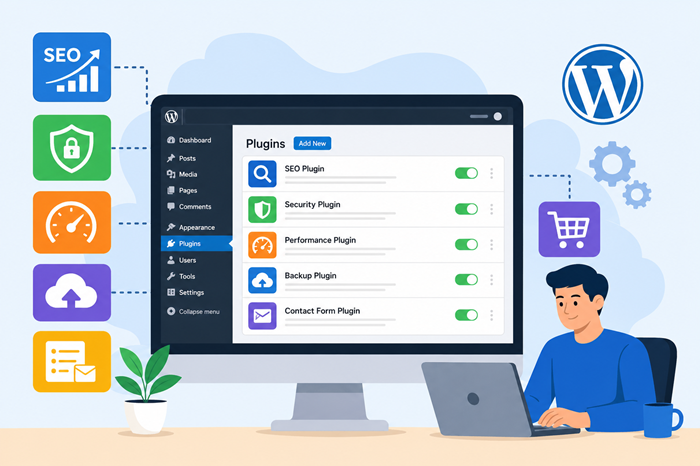
Five Popular WordPress Plugins Worth Considering
While every website has different needs, some plugins have consistently earned the trust of WordPress users because of their reliability and performance. Here are five of the most widely used options today:
Rank Math SEO
Rank Math SEO helps optimize your website for search engines by managing meta titles, descriptions, XML sitemaps, schema markup, and on-page SEO recommendations from a single dashboard.
Wordfence Security
Wordfence Security protects your website against malware, brute-force attacks, and other security threats with a powerful firewall and real-time monitoring features.
UpdraftPlus
UpdraftPlus makes it easy to schedule automatic backups and restore your website whenever needed. It’s an excellent choice for protecting your content and minimizing downtime.
WP Rocket
WP Rocket is a premium caching plugin designed to improve page speed through features like page caching, lazy loading, file optimization, and database cleanup.
WooCommerce
WooCommerce transforms a standard WordPress website into a fully functional online store, offering everything from product management and secure payments to shipping and inventory control.
Free vs Premium Plugins
Many business owners begin with free wordpress plugins, which often provide enough functionality for smaller websites or new businesses.
As websites grow, premium plugins typically offer:
- Advanced features
- Better customer support
- Frequent updates
- Greater customization
- Improved compatibility
Rather than focusing only on price, consider the long-term value a premium solution brings to your business.
Avoid Installing Too Many Plugins
One common misconception is that more plugins automatically create a better website.
In reality, excessive wordpress plugins often create:
- Slower loading speeds
- Plugin conflicts
- Increased security risks
- More maintenance requirements
- Higher chances of compatibility issues
Instead, prioritize quality over quantity and periodically remove inactive or unnecessary plugins.
Why Professional Plugin Management Matters
Installing plugins is only the beginning. Regular updates, testing, troubleshooting, and performance monitoring ensure your website remains secure and efficient over time.
Many businesses underestimate the effort required to maintain a growing WordPress website. Understanding what affects custom WordPress ecommerce development cost also includes considering long-term plugin management, optimization, and ongoing technical support—not just the initial website build.
Professional maintenance reduces downtime, prevents conflicts, and keeps your website performing at its best.
Building a Future-Ready Website
Technology evolves quickly, and so do customer expectations. The wordpress plugins you choose today should continue supporting your business as your website grows.
Rather than chasing every new plugin release, focus on trusted solutions that receive consistent updates, maintain excellent compatibility, and solve real business challenges.
Must-Have Plugin Categories for Growing Websites
As your website expands, your requirements will evolve. The right wordpress plugins should support growth without adding unnecessary complexity. Focus on categories that improve usability, efficiency, and long-term website health.
Forms and Lead Generation
Contact forms, quote requests, newsletter signups, and appointment booking tools help convert visitors into customers. Select plugins that are easy to customize and integrate with your preferred marketing platforms.
eCommerce Functionality
If you operate an online store, choosing the right extensions is just as important as selecting the platform itself. Understanding everything you need to know unlimited wordpress development can help you plan a scalable website that supports future business growth instead of relying on short-term fixes.
User Experience Enhancements
A fast, intuitive website encourages visitors to stay longer and interact with your content. When improving navigation and page layouts, it’s also worth learning about hidden website design pricing factors most businesses before making major design decisions, as thoughtful UX improvements often deliver a better return than unnecessary redesigns.
Keeping WordPress Plugins Healthy
Installing wordpress plugins isn’t a one-time task. Regular maintenance helps prevent compatibility issues, improves security, and ensures your website continues to perform efficiently.
A good maintenance routine includes:
- Updating plugins regularly
- Removing unused plugins
- Testing major updates before deployment
- Monitoring website performance
- Reviewing plugin compatibility after WordPress core updates
Businesses that prefer ongoing technical support often benefit from unlimited wordpress expert retainers, giving them continuous access to experienced developers without the cost of hiring an in-house team.
Why Ducky Unlimited Is the Right Partner
Choosing quality wordpress plugins is only one part of building a successful website. Long-term success depends on how well those tools are configured, maintained, and optimized.
Ducky Unlimited helps businesses create faster, more secure, and easier-to-manage WordPress websites through ongoing development, proactive maintenance, and expert technical support. Instead of reacting to website problems after they appear, their team focuses on preventing issues while helping your website scale with confidence.
If you’ve ever wondered wordpress how to use plugins, working with experienced professionals removes the guesswork and ensures every plugin contributes to your business goals.
Conclusion
The right wordpress plugins can transform your website by improving functionality, security, speed, and user experience. Rather than installing every popular option, focus on trusted, well-supported solutions that match your business needs.
With thoughtful plugin selection and ongoing maintenance, your WordPress website becomes easier to manage, performs better for visitors, and remains prepared for future growth.
FAQs
1. How many WordPress plugins should I install?
Only install the plugins your website genuinely needs.
2. Can too many plugins slow down a website?
Yes, unnecessary or poorly coded plugins can reduce performance.
3. Should I always update plugins?
Yes, regular updates improve security and compatibility.
4. Are premium plugins worth buying?
They often provide better support, features, and long-term reliability.
5. How do I choose the right plugin?
Select actively maintained plugins with strong reviews and proven compatibility.