
 May 8, 2026
Starting an online store today is easier than it was a few years ago, but building a site that attracts visitors and converts them into paying customers still requires the right strategy. A successful online shop is more than a product catalog. It needs fast performance, clear navigation, strong branding, optimized product pages, and a smooth checkout experience.
If you’ve been wondering what is e-commerce and how businesses build profitable online stores from scratch, this guide walks you through the complete process. From choosing the right platform to designing pages that improve conversions, you’ll learn exactly how to create a store that’s ready for long-term growth.
Whether you’re launching a small startup or planning to scale a larger e-commerce business, these steps will help you avoid common mistakes and build a site customers trust.
Start With a Clear Business Plan
Before you design anything, define the foundation of your store.
Think about:
- What products you’ll sell
- Who your target audience is
- Your pricing strategy
- Shipping locations
- Payment methods
- Competitor positioning
A clear plan helps you make smarter decisions later, especially when selecting your platform, branding style, and marketing approach.
You should also decide whether you’ll manage inventory yourself, use dropshipping, or work with fulfillment partners. Each model affects your website structure and operational workflow differently.
Choose the Right Platform for Your Store
Your platform will influence everything from design flexibility to SEO performance and scalability.
Some platforms are beginner-friendly, while others offer advanced customization for growing brands. If you’re comparing solutions, this guide on 8 ecommerce platform for seo explains which platforms perform best for search visibility and long-term growth.
When choosing a platform, look for:
Ease of Use
A simple dashboard saves time and reduces technical frustration. You should be able to manage products, orders, and pages without needing constant developer support.
SEO Features
Look for built-in features like:
- Editable URLs
- Fast loading speed
- Mobile responsiveness
- Meta title controls
- Image optimization
- Schema support
Payment and Shipping Integrations
Your store should support popular payment gateways and flexible shipping options that match your business needs.
Scalability
Choose a solution that can grow with your store. Migrating later can be time-consuming and expensive.
Secure a Domain Name and Hosting
Your domain name should be short, memorable, and easy to spell.
Avoid complicated words, unnecessary hyphens, or numbers. Ideally, your business name and domain should match closely to strengthen brand recognition.
Hosting also matters more than many new store owners realize. Slow websites reduce conversions and hurt rankings in search results.
Good hosting should provide:
- Fast server response times
- High uptime
- SSL security
- Daily backups
- Scalable resources
A secure site builds trust immediately with visitors.
Design Your Store Around User Experience
A beautiful site is helpful, but usability matters even more.
Visitors should instantly understand:
- What you sell
- How to browse products
- How to complete purchases
Clean layouts consistently outperform cluttered designs.
Keep Navigation Simple
Your menu structure should be intuitive. Organize products into logical categories and avoid overwhelming users with too many choices.
For example:
- Home
- Shop
- Categories
- About
- Contact
- FAQ
The easier it is to navigate, the more likely visitors are to continue browsing.
Focus on Mobile Design
Most shoppers now browse on phones first. Your site should look polished and load quickly on smaller screens.
Make sure:
- Buttons are easy to tap
- Text is readable
- Images resize properly
- Checkout works smoothly on mobile devices
Use Consistent Branding
Your colors, fonts, product images, and messaging should create a cohesive experience.
Strong branding makes smaller businesses appear more trustworthy and established.
Create High-Converting Product Pages
Product pages are where buying decisions happen.
A weak product page can lose sales even if your traffic is strong.
Write Clear Product Descriptions
Focus on benefits, not just features.
Instead of only listing specifications, explain how the product improves the customer’s life or solves a problem.
Good descriptions should:
- Answer common questions
- Highlight value
- Use readable formatting
- Include keywords naturally
Use High-Quality Images
Customers can’t physically touch products online, so visuals matter significantly.
Include:
- Multiple angles
- Zoom functionality
- Lifestyle images
- Close-up details
Professional photography improves credibility instantly.
Add Reviews and Social Proof
Customer reviews help reduce uncertainty.
Real feedback increases trust and often improves conversion rates.
You can also display:
- Star ratings
- User-generated photos
- Testimonials
- Purchase counts
Build a Faster Checkout Process
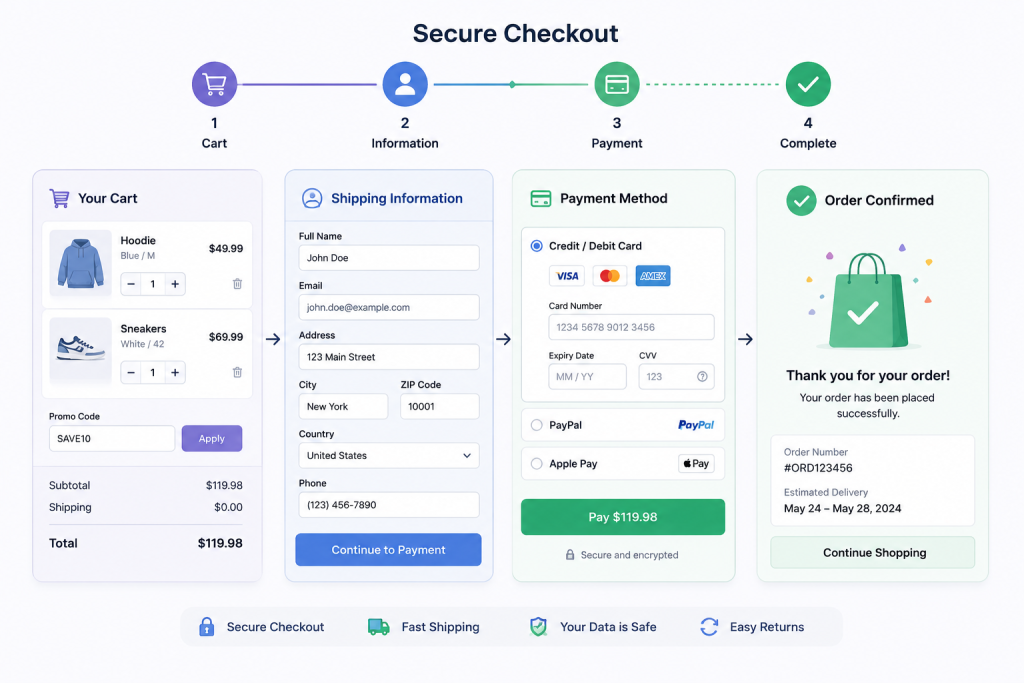
Complicated checkouts are one of the biggest reasons shoppers abandon carts.
Reduce friction wherever possible.
Allow Guest Checkout
Not every customer wants to create an account before purchasing.
Giving users a guest checkout option can improve conversions immediately.
Offer Multiple Payment Methods
Customers expect flexibility.
Popular options include:
- Credit cards
- PayPal
- UPI
- Apple Pay
- Google Pay
The more convenient the payment experience, the fewer abandoned purchases you’ll face.
Be Transparent About Costs
Unexpected shipping fees are a major conversion killer.
Display shipping costs, taxes, and delivery estimates early in the buying process.
Optimize Your Website for Search Engines
Search visibility is essential for consistent traffic growth.
Strong SEO helps customers discover your products organically without relying entirely on ads.
Research Buyer-Focused Keywords
Target search terms that show clear purchase intent.
For example:
- “best wireless headphones”
- “organic skincare products”
- “modern office chairs”
Use keywords naturally in:
- Product titles
- Meta descriptions
- URLs
- Category pages
- Blog content
Create Helpful Blog Content
Content marketing helps attract visitors earlier in the buying journey.
Educational articles, tutorials, and buying guides can increase authority and drive additional traffic over time.
If you’re still exploring how online stores operate, learning how to learn ecommerce can help you understand the bigger picture before scaling your store aggressively.
Improve Site Speed
Fast-loading sites perform better in search rankings and provide a better user experience.
Compress images, minimize unnecessary scripts, and use reliable hosting to keep performance strong.
Develop a Smart Marketing Strategy
Building a site is only part of the process. You also need a strategy to attract and retain customers.
A strong e-commerce marketing plan usually combines several channels together.
Use Email Marketing
Email remains one of the highest-converting channels for online stores.
Use it for:
- Welcome sequences
- Abandoned cart reminders
- Product launches
- Promotions
- Customer retention
Building an email list early creates a valuable long-term asset.
Invest in Social Media
Choose platforms where your audience already spends time.
Visual products often perform especially well on:
- TikTok
Consistency matters more than posting everywhere at once.
Run Paid Advertising Carefully
Paid ads can accelerate growth, but they require testing and optimization.
Start with small budgets while learning which audiences and creatives perform best.
Decide Between Marketplaces and Your Own Website
Many beginners struggle with deciding whether to sell through marketplaces or build their own branded store.
Marketplaces can offer quick exposure, but your own site gives you more control over branding, customer relationships, and long-term profitability.
This breakdown of selling on amazon vs own website explains the advantages and disadvantages of both approaches.
For many businesses, combining both strategies works best during the early growth phase.
Invest in Professional Design and Development
DIY builders are useful, but professional support can significantly improve performance, branding, and scalability.
Experienced designers understand how to structure pages for better conversions while developers ensure the technical side runs smoothly.
If you’re planning a serious online brand, investing in unlimited web design can help maintain a polished store experience as your business evolves.
Professional support often saves time, prevents technical issues, and creates a more competitive customer experience.
Strengthen Trust With Customers
Trust is one of the biggest factors in online purchasing decisions.
Visitors are far more likely to buy when your site appears secure and professional.
Include Important Trust Elements
Make sure your store includes:
- Contact information
- Refund policy
- Shipping details
- Privacy policy
- Secure checkout badges
These details reassure customers before they enter payment information.
Display Real Business Information
Adding an address, phone number, or business registration details can make your brand feel more legitimate.
Transparency increases confidence.
Track Analytics and Improve Continuously
Your first version of the website is only the beginning.
Successful online stores constantly analyze customer behavior and improve performance over time.
Monitor:
- Traffic sources
- Conversion rates
- Bounce rates
- Cart abandonment
- Best-selling products
Analytics help identify opportunities for improvement and smarter decision-making.
Small adjustments can produce major increases in sales over time.
Final Thoughts
Building a successful online store requires more than attractive design. The best stores combine strong branding, smooth navigation, optimized product pages, reliable performance, and strategic marketing.
Focus on creating a customer experience that feels simple, trustworthy, and fast from the first click to checkout completion.
As your business grows, continue refining your store based on customer feedback, analytics, and market trends. Consistent improvements will help your site stay competitive and profitable in a rapidly evolving digital marketplace.
FAQs
How much does it cost to build an online store?
Costs vary depending on design complexity, platform choice, and custom features.
Which platform is best for beginners?
Shopify is often considered beginner-friendly because of its simple setup process.
How long does it take to launch an online store?
A basic store can launch within a few weeks, while custom sites may take several months.
Do I need coding knowledge to build a store?
Most modern platforms allow beginners to create stores without coding skills.
Can I grow traffic without paid ads?
Yes, SEO, email marketing, and content creation can generate long-term organic traffic.
What is unlimited web design?
Unlimited web design is a monthly service that provides ongoing website design requests and updates for one fixed price.