
 April 29, 2026
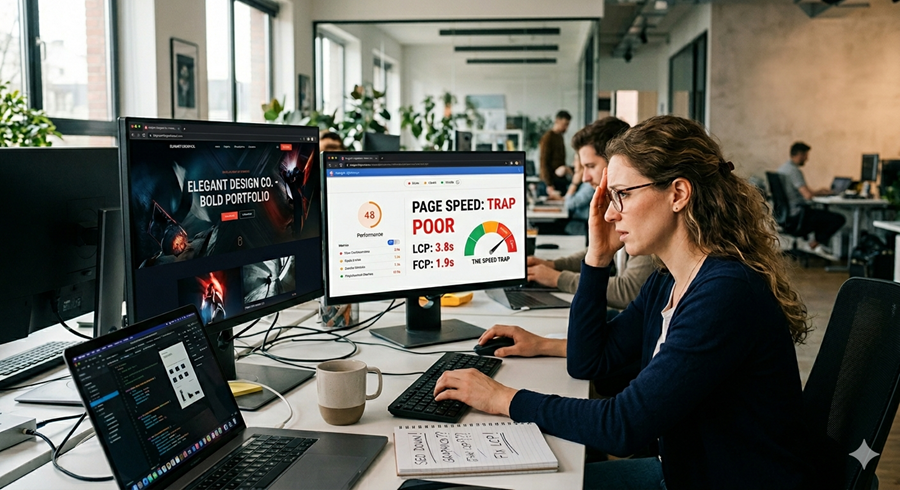
Modern websites are expected to look polished, interactive, and visually impressive. But there’s a growing problem many brands overlook: oversized visuals and design-heavy pages can quietly damage search visibility, frustrate visitors, and reduce conversions.
The truth is simple. A visually stunning site means very little if users leave before the page even loads.
Businesses investing heavily in flashy visuals often assume better aesthetics automatically improve engagement. In reality, poor performance caused by heavy media files can weaken rankings, increase bounce rates, and create a frustrating experience across mobile devices. Finding the balance between design quality and performance is now essential for long-term growth.
This guide explains why graphic-heavy websites often struggle in search results and how smarter optimization can protect both visual appeal and site performance.
Why Website Speed Matters More Than Ever
Search engines prioritize user experience. Fast-loading websites typically keep users engaged longer, improve interaction rates, and encourage visitors to explore more pages.
When a website takes too long to load, users rarely wait around. Even a delay of a few seconds can lead to abandoned sessions, lost sales opportunities, and declining search visibility.
Performance now directly affects:
- User engagement
- Mobile usability
- Conversion rates
- Search rankings
- Crawl efficiency
This is why website owners can no longer separate design decisions from performance strategy.
The Real Problem With High-End Graphics
Premium visuals are not inherently bad. The issue starts when websites rely on oversized files, unnecessary animations, or poorly optimized assets.
Many modern websites overload pages with:
- Massive background videos
- High-resolution hero images
- Heavy animation libraries
- Uncompressed image galleries
- Complex visual effects
- Auto-playing media
These elements may look impressive initially, but they often create a slower browsing experience that hurts both users and search engines.
A business investing with smart and unlimited web design services should always prioritize performance-friendly creative assets rather than focusing only on visual complexity.
How Heavy Visuals Affect Search Visibility
Slower Page Speed Reduces Rankings
Search engines measure loading performance as part of ranking evaluation. Websites with poor loading times often struggle to compete against faster alternatives.
Large graphics increase:
- Server response time
- Render-blocking resources
- Mobile loading delays
- Core Web Vitals issues
The result is a weaker overall user experience signal.
Mobile Users Suffer the Most
Desktop users with fast internet connections may not immediately notice loading problems. Mobile visitors, however, experience every delay much more intensely.
Heavy pages consume more data, drain battery life faster, and create frustrating interactions on slower networks.
Since mobile-first indexing is now standard, poor mobile performance can significantly reduce organic visibility.
Crawl Budget Gets Wasted
Search engine crawlers allocate limited resources to each website. Large media-heavy pages can consume unnecessary crawl time, reducing indexing efficiency across the rest of the site.
This becomes especially problematic for larger websites with hundreds or thousands of pages.
The Hidden Conversion Problem
Performance issues affect more than rankings.
Visitors subconsciously associate slow websites with poor reliability. If pages hesitate, stutter, or lag, trust declines instantly.
A slow experience can lead to:
- Higher bounce rates
- Lower lead generation
- Reduced sales
- Fewer page views
- Lower session duration
Many businesses focus heavily on attracting traffic but ignore the experience visitors actually receive after arriving.
That’s where strategic design decisions matter.
Common Graphic Design Mistakes That Hurt Performance
Using Oversized Images Everywhere
Uploading full-resolution images directly from cameras or design software is one of the most common mistakes.
A homepage banner does not need a 12MB image file to look professional.
Proper image scaling and compression can dramatically improve loading speed without reducing visible quality.
Relying Too Much on Animations
Motion effects can enhance engagement when used carefully. But excessive animations increase CPU usage, especially on mobile devices.
Heavy transitions and interactive effects often create sluggish browsing experiences.
Poor Font Loading Practices
Custom typography improves visual identity, but loading too many font variations increases page weight.
Limiting font families and reducing unused styles can significantly improve performance.
Ignoring Visual Consistency
Some websites continuously add new graphics, layouts, and visual styles without maintaining a structured design system.
Strong consistent branding helps reduce unnecessary design clutter while creating a cleaner and more efficient user experience.
The Balance Between Design and Performance
High-performing websites are not plain or boring. They simply use smarter optimization techniques.
Good design should support usability instead of competing against it.
The best-performing websites focus on:
- Clean layouts
- Optimized media
- Intentional animations
- Mobile-friendly visuals
- Efficient coding practices
Visual quality and fast performance can absolutely coexist when planned correctly.
Practical Ways to Fix Graphic-Heavy Websites
Compress Every Image Properly
Modern image compression tools reduce file sizes dramatically while preserving visual quality.
Preferred formats include:
- WebP
- AVIF
- Optimized SVG files
Compression alone can improve loading speed immediately.
Use Lazy Loading
Lazy loading delays off-screen images until users scroll down the page.
This reduces initial page weight and improves first-load performance significantly.
Limit Background Videos
Background videos should only be used when they genuinely improve communication or storytelling.
Otherwise, static optimized visuals often achieve similar impact with far better performance.
Optimize Third-Party Scripts
Many websites unknowingly load excessive tracking tools, animation plugins, and design scripts.
Removing unused scripts reduces resource consumption and improves responsiveness.
Create Smarter Design Systems
A professional graphic design team can help businesses build scalable visual systems that maintain quality without slowing down the site.
Efficient design systems reduce unnecessary duplication and improve consistency across all pages.
Why Technical Optimization Matters
Beautiful visuals alone cannot compensate for technical problems.
A proper technical seo audit helps identify hidden issues affecting page performance, indexing, and overall usability.
These audits often uncover:
- Render-blocking resources
- Unoptimized media files
- Mobile performance issues
- Slow-loading scripts
- Poor caching configuration
Without technical evaluation, many businesses continue investing in visuals while unknowingly damaging their own visibility.
The Role of Modern Search Performance Strategy
Successful websites now require collaboration between developers, designers, and optimization specialists.
A technical seo specialist typically focuses on improving performance while preserving user experience and visual quality.
This collaborative approach helps businesses avoid common mistakes like:
- Overdesigned landing pages
- Excessive interactive elements
- Heavy JavaScript frameworks
- Poor mobile rendering
The goal is not to eliminate design creativity. It is to ensure creativity supports usability instead of slowing it down.
Why Minimalism Often Performs Better
Many of today’s highest-converting websites are visually clean, focused, and lightweight.
Minimalism works because it:
- Improves readability
- Enhances navigation
- Reduces distractions
- Loads faster
- Simplifies user decisions
Users appreciate websites that feel smooth, responsive, and easy to navigate.
A polished experience matters more than excessive visual effects.
How SEO and Design Should Work Together
Design and optimization should never operate separately.
Strong seo performance depends heavily on how users interact with a website. That means design choices directly influence visibility.
Similarly, modern seo services should consider visual performance, user behavior, and page experience instead of focusing only on keywords or backlinks.
When design teams and optimization teams collaborate early, websites become faster, cleaner, and far more effective overall.
Final Thoughts
High-end visuals can strengthen a brand when used strategically. But when websites prioritize visual complexity over performance, the consequences quickly appear in rankings, engagement, and conversions.
The best-performing websites today are not necessarily the flashiest. They are the ones that combine smart design with fast, seamless usability.
Businesses that optimize graphics carefully, reduce unnecessary page weight, and prioritize user experience will consistently outperform slower competitors.
In modern digital marketing, speed is no longer optional. It is part of the experience users expect from every website they visit.
FAQs
1). Can large images really hurt search rankings?
A). Yes, oversized images can slow page speed significantly, which negatively affects user experience and rankings.
2). What image format is best for website performance?
A). WebP and AVIF formats are commonly recommended because they maintain quality with smaller file sizes.
3). Do animations affect website speed?
A). Heavy animations and excessive motion effects can increase loading time and reduce mobile performance.
4). Why is mobile optimization important for search visibility?
A). Search engines primarily evaluate mobile experiences, so slow mobile pages can reduce organic visibility.
5). Should design quality be sacrificed for faster speed?
A). No, smart optimization allows websites to maintain professional visuals while improving performance.