

 May 18, 2026
Website speed has become one of the biggest ranking and conversion factors for modern businesses. A slow-loading page not only frustrates visitors but also affects search visibility, bounce rates, and sales. One of the biggest causes of slow page speed is unoptimized imagery — especially oversized visuals used in banners, product pages, and hero sections.
If your website relies on high-resolution graphics to create a polished visual experience, you might assume reducing image size means sacrificing quality. Fortunately, that’s no longer true. With the right optimization methods, you can dramatically improve page speed while keeping visuals crisp and professional.
In this guide, you’ll learn practical ways to optimize graphics for faster loading performance, improve user experience, and strengthen your search rankings without damaging image quality.
Why LCP Matters for Website Performance
Largest Contentful Paint measures how quickly the largest visible element on a webpage loads for users. In many cases, that element is an image, banner, slider, or featured graphic.
Google considers this metric a major part of Core Web Vitals because it directly impacts user perception. If visitors wait too long to see the main content, they are far more likely to leave.
A slow-loading visual can hurt:
- Organic rankings
- Conversion rates
- User engagement
- Mobile usability
- Ad performance
This is why improving visual performance should be part of every modern optimization strategy.
What Causes Slow Graphic Loading?
Many websites unknowingly upload oversized files directly from design software without preparing them for the web.
Common issues include:
Oversized Dimensions
Uploading a 4000px-wide image for a section that only displays at 1200px wastes bandwidth and slows rendering.
Poor File Compression
Heavy PNG or JPEG files can increase loading time significantly when compression is ignored.
Too Many Visual Elements
Large sliders, animations, and layered graphics create unnecessary loading overhead.
Unoptimized Formats
Older image formats often produce larger file sizes compared to newer alternatives.
Understanding these issues is the first step toward better performance optimization.
Choose the Right Image Dimensions
One of the easiest ways to improve page speed is resizing graphics before uploading them.
Instead of relying on browsers to shrink massive images dynamically, export visuals at the exact dimensions needed for the layout.
For example:
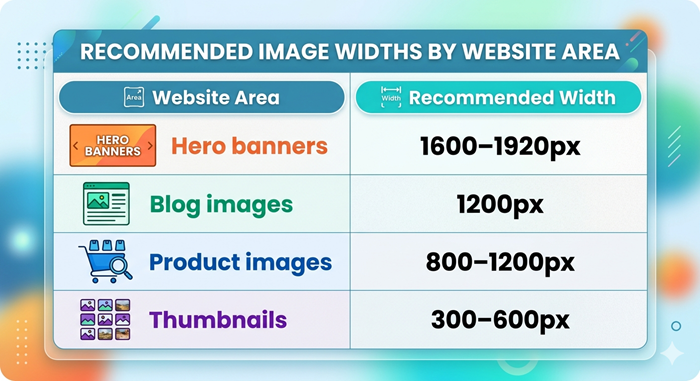
Properly sized images reduce unnecessary data transfer and help browsers render content faster.
Use Modern Image Formats
Modern formats provide excellent visual quality while dramatically reducing file size.
Many developers now compare formats like AVIF vs WebP when optimizing websites because both offer better compression than traditional JPEG and PNG files.
WebP Benefits
- Smaller file sizes
- Broad browser support
- Excellent compression quality
AVIF Benefits
- Superior compression efficiency
- Better image quality retention
- Reduced bandwidth usage
Using next-generation formats can significantly reduce rendering delays across desktop and mobile devices.
Compress Images Without Losing Quality
Compression tools remove unnecessary image data while preserving visual clarity.
Lossless compression is ideal when maintaining design quality is important, especially for branding visuals, product photography, and portfolio websites.
Recommended practices include:
- Compress before upload
- Avoid exporting at maximum quality
- Remove hidden metadata
- Use adaptive compression settings
When done properly, visitors rarely notice any visual difference.
Prioritize Above-the-Fold Images
The most important image on your page should load immediately.
Usually, this is:
- Hero banners
- Featured blog visuals
- Product showcase images
- Main landing page graphics
Because these visuals often affect largest contentful paint, optimizing them has a direct impact on page speed scores.
How to Prioritize Key Graphics
You can improve loading speed by:
- Preloading important images
- Reducing render-blocking resources
- Using lightweight layouts
- Limiting large background visuals
Fast rendering creates a smoother experience for users and search engines alike.
Implement Lazy Loading Carefully
Lazy loading delays offscreen images until users scroll near them.
This improves initial page speed because browsers load only essential content first.
However, lazy loading should never be applied to critical above-the-fold visuals. Doing so can delay rendering and negatively affect performance metrics.
Best use cases include:
- Blog galleries
- Product collections
- Long-form articles
- Portfolio pages
Smart implementation improves speed without compromising usability.
Optimize Mobile Graphics Separately
Mobile visitors often experience slower internet connections and limited device performance.
Graphics that load quickly on desktop may still perform poorly on smartphones.
To improve mobile speed:
- Use responsive image sizing
- Reduce oversized background images
- Serve smaller versions for mobile devices
- Eliminate unnecessary animations
Responsive optimization helps maintain visual quality while reducing data usage.
Reduce Heavy Design Elements
Modern websites often overuse visual effects that slow rendering performance.
Examples include:
- Large sliders
- Auto-playing videos
- Layered animations
- Heavy shadows and overlays
Simplifying layouts can improve speed dramatically while creating a cleaner user experience.
Many brands working with unlimited web design teams now prioritize lightweight design systems that balance aesthetics with performance.
Improve Server Delivery Speed
Image optimization is only part of the equation. Delivery speed also affects loading performance.
Slow hosting environments increase delays even when files are compressed properly.
Ways to Improve Delivery
- Use a CDN
- Enable browser caching
- Optimize server response time
- Minify CSS and JavaScript
- Use HTTP/2 or newer protocols
Combining server optimization with image compression produces stronger overall results.
Use Responsive Image Techniques
Responsive image attributes allow browsers to serve different image sizes based on screen resolution and device type.
This prevents mobile devices from downloading unnecessarily large visuals.
Popular techniques include:
srcsetsizes- Adaptive image rendering
- Dynamic image scaling
These methods improve speed while maintaining sharp visuals across all devices.
Minimize Graphic Design Bloat
Some websites become visually overloaded because multiple departments upload assets without optimization standards.
This often leads to inconsistent file formats, duplicate graphics, and oversized visuals.
Businesses considering hiring an unlimited graphic design team should ensure performance optimization guidelines are included in the workflow from the start.
Consistent design standards reduce unnecessary page weight and improve scalability.
Improve Ecommerce Image Performance
Online stores rely heavily on visuals to drive conversions, but product-heavy pages can easily become slow.
Image optimization is especially important for:
- Product pages
- Category grids
- Homepage banners
- Promotional graphics
Many businesses implementing advanced seo strategies for e-commerce website performance now prioritize compressed product imagery alongside structured technical improvements.
Faster product pages improve both rankings and customer experience.
Use Performance Audits Regularly
Optimization should never be treated as a one-time task.
As websites grow, new graphics, plugins, and design elements can slowly reduce performance again.
Regular audits help identify:
- Oversized images
- Broken compression workflows
- Unused assets
- Render-blocking resources
- Slow-loading templates
A skilled technical seo specialist can uncover hidden issues that affect rendering performance and overall search visibility.
Routine monitoring helps maintain consistent loading speed over time.
Balance Design Quality With Performance
Many businesses fear optimization will weaken branding or reduce visual appeal.
In reality, modern optimization tools allow websites to maintain sharp visuals while reducing file sizes dramatically.
The goal is balance.
Visitors want websites that:
- Look professional
- Load instantly
- Work smoothly on mobile
- Feel visually engaging
The best-performing websites combine attractive design with efficient technical execution.
Technical Improvements Beyond Images
Graphics are important, but several other factors also influence loading performance.
Code Optimization
Reducing unused CSS and JavaScript improves rendering speed.
Font Optimization
Heavy font libraries can delay page rendering.
Third-Party Scripts
Excessive tracking tools and widgets often slow down websites significantly.
Layout Stability
Avoid sudden content shifts that disrupt user experience.
Professional technical seo services often address all these areas together for maximum performance improvement.
Why Technical SEO Supports Faster Graphics
Image optimization works best when combined with broader technical improvements.
Strong technical seo services help websites:
- Improve crawl efficiency
- Reduce rendering delays
- Strengthen Core Web Vitals
- Optimize mobile usability
- Improve search visibility
Performance optimization should always be part of a complete SEO strategy rather than treated as an isolated task.
Best Practices to Improve Loading Speed
Here are some practical recommendations businesses can implement immediately:
Resize Before Uploading
Never upload oversized originals directly from design software.
Compress Every Visual
Use modern compression tools consistently.
Use Modern Formats
Switch to WebP or AVIF whenever possible.
Prioritize Important Graphics
Load critical visuals first.
Audit Regularly
Monitor performance continuously.
These small improvements often create substantial speed gains over time.
Common Mistakes to Avoid
Even well-designed websites often make avoidable optimization mistakes.
Uploading Raw Design Files
Massive exports from Photoshop or Illustrator increase load time unnecessarily.
Ignoring Mobile Optimization
Desktop-only optimization leaves mobile performance weak.
Using Too Many Animations
Heavy motion effects increase rendering complexity.
Forgetting Compression
Even beautiful visuals become problematic without optimization.
Avoiding these issues helps maintain strong performance consistently.
Conclusion
Optimizing visuals for faster loading performance no longer requires sacrificing quality. With proper compression, responsive sizing, modern formats, and efficient delivery methods, businesses can create visually impressive websites that also load quickly.
Improving largest contentful paint (lcp) is ultimately about creating a faster, smoother experience for users while supporting stronger search performance.
Whether you manage a blog, ecommerce store, or company website, investing time into image optimization can lead to better engagement, higher rankings, and improved conversions.
For businesses wondering how to improve largest contentful paint effectively, combining visual optimization with broader performance enhancements is the smartest long-term approach.
FAQs
What is Largest Contentful Paint?
Largest Contentful Paint measures how quickly the main visible content loads on a webpage.
Do compressed images reduce quality?
Modern compression tools preserve visual quality while significantly reducing file size.
Which image format is best for faster websites?
WebP and AVIF are currently among the best formats for balancing quality and speed.
Why are large images bad for SEO?
Oversized graphics slow page loading, which can negatively affect rankings and user experience.
How often should websites audit image performance?
Performance audits should ideally be performed every few months or after major site updates.