
 June 25, 2026
Interaction to Next Paint (INP) has become one of the most important performance metrics for website owners who want to deliver a fast, responsive browsing experience. As part of Google’s Core Web Vitals, INP measures how quickly a website responds to user interactions such as clicks, taps, and keyboard inputs.
If your site feels sluggish when visitors interact with buttons, forms, menus, or other elements, your INP score may be suffering. For businesses running WordPress websites, improving responsiveness can directly impact user engagement, conversions, and search visibility.
In this guide, you’ll learn practical strategies to improve INP for WordPress, identify common performance bottlenecks, and create a smoother experience for your visitors.
Understanding INP and Why It Matters
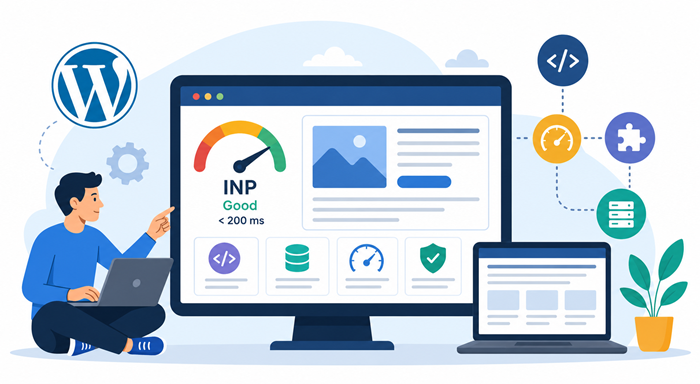
Interaction to Next Paint measures the time between a user’s interaction and the moment the browser displays the resulting visual update.
A good INP score indicates that users receive immediate feedback after interacting with your website. Poor scores often make a website feel slow, frustrating, and unresponsive.
Google considers user experience a ranking factor, making site responsiveness an important aspect of modern SEO. While many site owners focus on loading speed, interaction performance deserves equal attention.
What Causes Poor INP Scores on WordPress Sites?
Several factors can negatively affect responsiveness.
Heavy JavaScript Execution
Large JavaScript files often block the main browser thread. When visitors click a button, the browser must finish executing scripts before processing the interaction.
The more JavaScript running in the background, the slower your website can respond.
Too Many Plugins
WordPress plugins add functionality, but excessive plugin usage often introduces additional scripts and processes.
Some plugins continuously run tasks in the background, creating delays when users interact with page elements.
Third-Party Scripts
Marketing tools, chat widgets, analytics platforms, and advertising scripts can significantly impact responsiveness.
Each external script competes for browser resources and may delay interaction handling.
Large DOM Structures
Pages containing thousands of HTML elements require more browser processing.
Complex layouts increase rendering time and can contribute to slower interactions.
Slow Server Responses
Even when interactions occur on the front end, server-related delays can affect dynamic actions such as form submissions, searches, and cart updates.
Run a Comprehensive Site Evaluation
Before making improvements, it’s important to identify performance issues.
A thorough technical seo audit can uncover hidden bottlenecks affecting responsiveness, rendering efficiency, and browser performance.
Tools such as PageSpeed Insights, Chrome DevTools, and Lighthouse provide valuable data about interaction delays and long tasks.
Pay close attention to:
- JavaScript execution times
- Main thread blocking
- Render delays
- Third-party script impact
- Long tasks exceeding 50 milliseconds
Once you understand the root causes, optimization becomes much easier.
Reduce JavaScript Processing Time
One of the fastest ways to improve INP is reducing JavaScript workload.
Remove Unnecessary Scripts
Review every plugin and theme feature currently active on your website.
Disable scripts that are not essential to user experience or business objectives.
Defer Non-Critical JavaScript
Scripts that are not needed immediately after page load should be deferred.
This allows browsers to prioritize rendering content and processing user interactions more efficiently.
Minify JavaScript Files
Minification removes unnecessary characters and whitespace from code.
Smaller files download faster and reduce processing overhead.
Optimize Plugin Usage
Many WordPress websites accumulate plugins over time.
Each plugin introduces additional code, database queries, and assets.
Conduct regular plugin audits and remove:
- Unused plugins
- Redundant functionality
- Poorly maintained extensions
- Performance-heavy tools
Replacing multiple plugins with a single optimized solution often leads to noticeable responsiveness improvements.
Improve Theme Performance
Your theme plays a major role in overall responsiveness.
Lightweight themes generally perform better than feature-heavy multipurpose alternatives.
Look for themes that:
- Use clean code
- Minimize JavaScript dependencies
- Load assets conditionally
- Follow modern development standards
A lean foundation makes future optimization efforts much more effective.
A well-structured site design can also contribute to better responsiveness and user engagement. Businesses looking to improve both performance and usability often invest in professional wordpress web design services that prioritize clean code, mobile optimization, and fast-loading page structures from the start.
Optimize Third-Party Resources
External tools frequently become major performance bottlenecks.
Evaluate Every Third-Party Script
Ask whether each script genuinely contributes value.
Many websites continue loading tools that no longer support business goals.
Delay Non-Essential Widgets
Chat tools, social feeds, and tracking systems can often be loaded after primary content becomes interactive.
This reduces competition for browser resources during critical user interactions.
Use Fewer Tracking Platforms
Consolidating analytics and marketing tools can significantly reduce script execution time.
Improve Browser Rendering Efficiency
The browser’s ability to update visual content quickly directly impacts INP.
Reduce Layout Shifts
Unexpected movement of page elements forces browsers to recalculate layouts.
Reserve space for images, advertisements, and embedded content whenever possible.
Simplify Page Structure
Complex page builders sometimes generate excessive HTML.
Reducing unnecessary containers and nested elements helps browsers render updates faster.
Optimize Animations
Heavy animations can consume processing resources.
Prefer CSS-based animations over JavaScript alternatives whenever possible.
Strengthen Server Performance
Fast hosting contributes to better interaction responsiveness.
Upgrade Hosting Infrastructure
Shared hosting environments often struggle during traffic spikes.
Managed hosting or cloud-based solutions typically provide faster response times and better resource allocation.
Implement Full-Page Caching
Caching reduces server workload and delivers content more efficiently.
Popular caching solutions can dramatically improve overall site performance.
Optimize Database Performance
Over time, WordPress databases accumulate unnecessary data.
Regular cleanup reduces query execution times and improves backend efficiency.
Why Website Speed and Responsiveness Work Together
Many website owners treat loading speed and interaction performance as separate concerns.
In reality, they are closely connected.
Understanding why website speed matters in seo helps businesses recognize how performance improvements can influence rankings, user satisfaction, and conversion rates.
A website that loads quickly but responds slowly still creates a poor user experience.
Reduce Long Tasks on the Main Thread
Long tasks occur when browsers spend extended periods processing code without responding to user actions.
Breaking large tasks into smaller chunks allows browsers to process interactions sooner.
Strategies include:
- Code splitting
- Lazy loading resources
- Deferring background processes
- Reducing script complexity
This approach helps maintain responsiveness even on resource-constrained devices.
Optimize Forms and Interactive Elements
Forms are among the most common interaction points on websites.
Poorly optimized forms can create noticeable delays.
Simplify Validation Logic
Complex real-time validation can increase processing requirements.
Use lightweight validation methods whenever possible.
Limit Dynamic Features
Auto-complete, conditional fields, and interactive widgets can affect responsiveness if poorly implemented.
Focus on functionality that genuinely improves user experience.
The Value of Ongoing Website Management
Website performance is not a one-time project.
As websites grow, new plugins, content, integrations, and design changes can gradually reduce responsiveness.
Businesses that rely on consistent updates often benefit from solutions like unlimited web design services that support continuous improvements without the complexity of hiring additional in-house staff.
Regular maintenance helps preserve performance gains and prevent future issues. Ducky Unlimited provides unlimited wordpress development support that helps companies continuously improve website functionality, performance, maintenance, and responsiveness without managing multiple freelancers or internal development resources.
Choosing the Right Development Partner
When evaluating support providers, pricing often becomes an important consideration.
Understanding typical average web designer hourly rates can help businesses compare traditional freelance arrangements with alternative service models that offer predictable monthly costs.
The right partner should balance expertise, responsiveness, and long-term value.
Scaling Website Operations Efficiently
As organizations expand, website management requirements become more demanding.
Many teams discover that maintaining performance, content updates, and ongoing improvements requires a more scalable solution.
This explains why growing agencies are embracing unlimited wordpress support as a way to streamline operations and maintain consistent website quality.
Scalable support structures help businesses keep pace with growth while maintaining strong performance standards.
Implement a Long-Term Performance Strategy
Improving responsiveness requires ongoing monitoring and refinement.
Create a recurring optimization process that includes:
- Monthly performance reviews
- Plugin audits
- Script evaluations
- Hosting assessments
- User experience testing
Consistent attention ensures your website continues delivering fast and responsive interactions.
Additionally, investing in reliable technical seo services can help identify performance opportunities that impact both search visibility and user experience.
For businesses managing frequent site updates, organizing unlimited wordpress tasks within a structured workflow can help maintain consistent optimization efforts over time.
Whether your website runs on wordpress for a small business or a large enterprise operation, prioritizing interaction responsiveness will improve engagement, user satisfaction, and long-term performance.
Conclusion
Improving INP for WordPress is about creating a faster, smoother, and more enjoyable experience for every visitor. By reducing JavaScript execution, optimizing plugins, improving rendering efficiency, limiting third-party scripts, and strengthening server performance, you can significantly enhance responsiveness across your website.
The most successful websites treat performance optimization as an ongoing process rather than a one-time task. Consistent monitoring, regular maintenance, and strategic improvements will help keep your site responsive, competitive, and aligned with modern user expectations.
Frequently Asked Questions
What is a good INP score?
An INP score below 200 milliseconds is generally considered good.
Does INP affect SEO rankings?
Yes, INP is part of Google’s Core Web Vitals and contributes to user experience signals.
Can plugins negatively impact INP?
Yes, excessive or poorly coded plugins can increase interaction delays.
How often should I test INP performance?
Monthly testing is recommended, especially after major website updates.
Does hosting affect INP?
Yes, faster hosting can improve responsiveness and overall website performance.