
 August 17, 2026
Businesses today publish content across websites, apps, landing pages, product experiences, and more. That makes the way content is created and delivered just as important as the content itself. A headless CMS separates content management from presentation, giving teams more freedom to build connected digital experiences.
If you are considering a modern content stack, understanding how a headless CMS changes daily work is essential. It can improve collaboration, speed up publishing, and make content easier to reuse across channels, but it also introduces new technical decisions.
Key Takeaways
- Separating content from presentation gives developers and marketers greater independence.
- API-driven publishing makes one content source useful across multiple channels.
- Better performance and technical flexibility can support stronger search visibility.
- The right setup depends on team skills, budget, integrations, and long-term goals.
What Is a Headless CMS and Why Does It Matter?
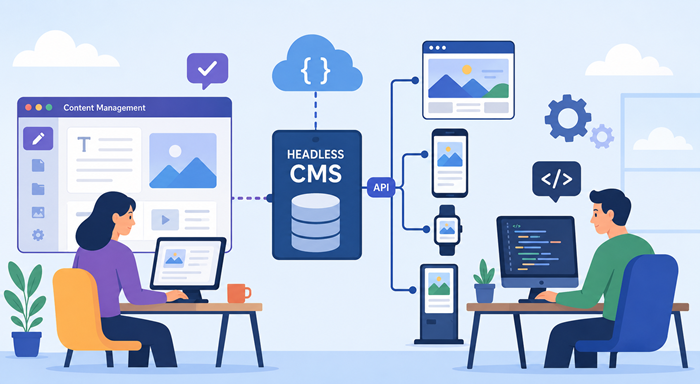
A headless CMS stores and organizes content without tying it to a specific website presentation. Instead of forcing content and design to live together, it delivers information through APIs to whichever frontend a business chooses.
In a traditional setup, changing the presentation layer can affect templates, plugins, and content workflows. With a headless CMS, content teams can focus on creating and managing information while developers build the customer-facing experience separately.
This separation is particularly useful for companies expecting their digital presence to grow. A single product description, article, image, or campaign message can be reused across a website, mobile application, kiosk, or other digital touchpoint.
Traditional CMS vs. Headless CMS
The biggest difference is how the system handles the relationship between content and presentation. Traditional platforms generally package the database, editing interface, templates, and frontend together. This remains practical for many websites because it is familiar and often quick to launch.
A headless CMS takes a different route. It acts primarily as a content hub, while the frontend is developed independently. This gives teams more control over design, technology choices, performance, and content distribution.
The trade-off matters. A traditional CMS may require less development knowledge, while a headless CMS often requires developers to manage APIs, frontend frameworks, hosting, caching, security, and integrations.
How Headless CMS Changes the Workflow
The most noticeable change is that teams can work in parallel. Writers and marketers can prepare content without waiting for frontend changes, while developers can improve the interface without rebuilding the content structure.
For example, a marketing team could prepare a seasonal campaign while developers refine its landing-page experience. Once approved, the same content can be delivered through the appropriate frontend.
This workflow can reduce bottlenecks and make responsibilities clearer. It also makes content operations more scalable because teams are less dependent on one tightly connected system.
For businesses looking for unlimited web design, this flexibility can be valuable when a website needs custom experiences rather than a collection of standard templates.
Headless CMS Architecture for Modern Technology
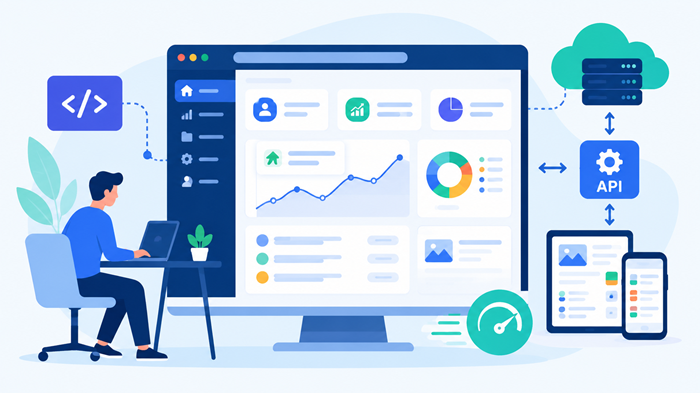
A modern headless cms architecture usually includes a content repository, APIs, a frontend application, and supporting services such as search, analytics, authentication, or ecommerce tools.
The frontend can use frameworks such as Next.js, Nuxt, React, Vue, or another technology that fits the project. The content layer does not need to know exactly how that interface will look.
This separation supports controlled development. Teams can test the frontend independently, introduce new experiences without migrating content, and replace one layer without rebuilding the entire platform.
Businesses interested in unlimited web development with cms can use this approach to create a content system that supports both current requirements and future channels.
Choosing Among Headless CMS Platforms
Not every headless CMS is designed for the same audience. Some prioritize ease of use for marketing teams, while others focus heavily on developer control, customization, localization, or enterprise governance.
When comparing headless cms platforms, consider the editor experience first. A technically powerful platform can still become a problem if marketers find it difficult to create, review, schedule, or update content.
Next, examine API quality, content modeling, media management, permissions, localization, preview tools, integrations, scalability, pricing, documentation, and support.
The best option is not necessarily the platform with the longest feature list. It is the one that fits your team’s workflow and technical capabilities.
5 Headless CMS Platforms to Consider
Once you understand what to look for in a content platform, it helps to compare a few established options. The following five platforms offer different approaches to content modeling, development flexibility, editorial workflows, and API-driven delivery.
1. Strapi
Strapi is an open-source, API-driven CMS designed with developers in mind. It supports REST and GraphQL APIs and can work with different databases and frontend technologies.
Strapi can be a strong choice for teams that want greater control over their CMS infrastructure and content structure. Its JavaScript-based ecosystem can also make it a practical option for development teams already working with modern JavaScript frameworks.
2. Sanity
Sanity focuses on structured content and flexible content management. Its Sanity Studio can be customized, while its Content Lake provides API-based access to content across different digital experiences.
It is particularly useful when the same content needs to be reused across websites, applications, ecommerce experiences, or other channels. Sanity also supports real-time previews and integrations with different frontend technologies.
3. Contentful
Contentful takes an API-first approach that separates content from presentation. Instead of relying on fixed page templates, teams can create structured content models and deliver that content through APIs.
This makes Contentful worth considering for organizations that need a scalable cloud-based platform and want their content to remain independent from a particular frontend technology.
4. Storyblok
Storyblok combines an API-driven architecture with an editor-focused experience. Its approach is designed to give content creators an accessible way to manage content while allowing developers to work with structured data through APIs.
Storyblok can be useful for teams that want a balance between editorial flexibility and frontend development freedom. It supports different technologies rather than requiring developers to use one specific frontend stack.
5. DatoCMS
DatoCMS is an API-first platform with GraphQL and content management APIs. It emphasizes a straightforward editing experience, structured content, previews, localization, and reusable content components.
Its support for frameworks such as Next.js, Nuxt, and Svelte can make it appealing to teams building modern frontend experiences. Localization and structured hierarchical content can also be useful for larger websites with multiple markets or complex navigation.
How to Choose the Right Platform
There is no single best platform for every project. Strapi may appeal to teams prioritizing open-source flexibility, while Sanity and Contentful are strong options for structured, reusable content. Storyblok can suit teams looking for a balance between developers and editors, while DatoCMS offers features focused on structured content and editorial workflows.
Before making a decision, compare API capabilities, content modeling, editor usability, localization, preview functionality, integrations, scalability, pricing, and the technical skills available within your team. The platform should fit your workflow rather than forcing your workflow to fit the platform.
Ecommerce and SEO Considerations
Ecommerce brands often need content to appear in product pages, category pages, editorial guides, mobile experiences, and campaign landing pages. A headless cms for ecommerce can make this easier by separating reusable content from the shopping interface.
However, architecture alone does not guarantee rankings. Search performance still depends on crawlability, page speed, internal linking, metadata, structured data, content quality, mobile usability, and other technical factors.
For brands comparing the best ecommerce for seo, the important question is not simply whether a platform is headless. It is whether the complete stack gives the SEO team control over URLs, canonical tags, redirects, metadata, structured data, rendering, and indexable content.
Headless CMS SEO: What Teams Need to Control
A headless CMS can support strong organic search performance, but SEO requirements must be planned during development rather than added at the end.
Developers should make sure important content is rendered in a way search engines can access reliably. They should also establish clean URL structures, XML sitemaps, canonical rules, redirects, robots directives, and metadata management.
Performance deserves equal attention. Lightweight frontend code, optimized images, caching, and sensible asset delivery can improve user experience and support technical SEO goals.
These details form the foundation of effective ecommerce seo strategies and broader organic search programs. The platform is only one part of the equation.
How Content Teams Benefit
For editors, the biggest advantage is freedom from frontend constraints. Content can be created and organized around business needs instead of being shaped by a particular page template.
A headless CMS also makes content reuse easier. An article can feed a website section, a related product experience, or an application without requiring the editorial team to copy and paste it into multiple systems.
Governance can improve as well. Clear roles, approval workflows, reusable content models, and centralized assets help larger teams maintain consistency while publishing at scale.
How Developers Benefit
Developers gain freedom to choose the frontend technology that makes sense for the project. They are not forced to work within a theme system or rigid template structure.
A headless CMS can also simplify experimentation. Teams can redesign the frontend, add a new channel, or introduce an integration while keeping the underlying content intact.
That flexibility comes with responsibility. Developers must maintain APIs, frontend applications, deployment pipelines, monitoring, security, and performance.
If you are hiring a website designer, make sure the role includes an understanding of content structure, UX, frontend performance, and the wider technology stack.
When Headless Is the Right Choice
A headless CMS makes the most sense when a business needs multiple digital channels, a highly customized frontend, frequent design changes, strong performance targets, or content models that support different experiences.
It may be unnecessary for a small brochure website with a simple publishing process. In that situation, a traditional CMS can provide everything the business needs with less development overhead.
The decision should start with workflow and business requirements, not technology trends.
Planning the Migration
Moving from a traditional platform should begin with a content audit. Identify valuable content, what needs restructuring, which URLs must remain stable, and which integrations are essential.
Next, map content models and define ownership. Decide who creates content, who approves it, and how publishing will work across teams.
A staged migration is often safer than moving everything at once. Launching a smaller section first gives the team an opportunity to test redirects, rendering, analytics, publishing workflows, and SEO before expanding the project.
It is also worth reviewing the best wordpress plugins currently used on an existing site. Some functions may need direct replacements, while others may become unnecessary in the new architecture.
Budget, Skills, and Ongoing Costs
The initial project cost can be higher because a separate frontend and content layer require more planning and development. Ongoing costs can include hosting, API usage, third-party services, monitoring, and maintenance.
That does not automatically make the approach more expensive. If the architecture reduces duplicated work, supports multiple channels, and makes future redesigns easier, the investment can pay off over time.
Before budgeting, compare development requirements with your team’s capabilities. Resources explaining how much do web designers make per hour can also provide useful context when estimating project labor.
Headless CMS Development: What to Plan For
Successful headless cms development requires more than selecting a content platform. Teams need a clear content model, API strategy, frontend framework, hosting approach, analytics setup, security plan, and testing process.
Preview functionality is particularly important. Editors should be able to see how content will appear before publishing, especially when several frontend experiences depend on the same source.
Documentation also matters. A clear record of content types, integrations, ownership, deployment processes, and SEO rules makes future maintenance easier and reduces dependency on individual developers.
Common Mistakes to Avoid
One common mistake is choosing a platform before defining the content model. Another is assuming that separating the frontend automatically improves performance or SEO.
Teams should also avoid underestimating preview workflows. Editors need confidence that content will appear correctly before it goes live.
Finally, document technical responsibilities early. A flexible system is most effective when everyone understands who manages content, code, integrations, security, and ongoing optimization.
The Future of Content Workflows
The real value of a headless CMS is not simply that it is modern. Its strength is the ability to separate content decisions from presentation decisions while keeping both parts connected through reliable APIs.
As businesses add new channels and expect faster digital experiences, that flexibility can become a competitive advantage. The right architecture allows teams to experiment without rebuilding their entire content foundation.
A successful implementation combines thoughtful content modeling, capable development, strong governance, and an SEO-friendly frontend. When those pieces work together, the technology supports the workflow instead of becoming the workflow.
Conclusion
The shift to a headless CMS changes more than the technology behind a website; it changes how teams create, publish, develop, and optimize digital experiences. By separating content from presentation, businesses can give marketers more independence and developers more control.
The best approach is to evaluate your channels, content workflow, technical resources, SEO requirements, and growth plans before choosing a platform. When those needs align, a headless architecture can create a faster, more flexible foundation for digital growth.
FAQs
What is a headless CMS?
It separates content management from the frontend presentation layer.
Is a headless CMS good for SEO?
Yes, when rendering, performance, metadata, URLs, and crawlability are properly managed.
Is headless CMS better than WordPress?
It depends on the project, with headless setups offering greater frontend flexibility.
Does headless CMS work for ecommerce?
Yes, it can support reusable content and customized shopping experiences across channels.
Is migrating to headless difficult?
It can be complex, but staged planning can significantly reduce migration risks.