

 July 22, 2026
When a visitor lands on a website, the server quietly returns a response that tells the browser what happened. That response is identified through status codes, which help communicate whether a page loaded successfully, moved to a new location, or encountered a problem.
For website owners, marketers, and SEO professionals, understanding status codes is more than a technical exercise. The right response can create a smooth user experience, while the wrong one can lead to broken pages, lost traffic, poor crawlability, and missed conversions.
This guide explains how status codes work, which responses matter most, and how they connect with technical SEO, website performance, redirects, and search visibility.
What Are Status Codes?
Status codes are three-digit responses sent by a web server after a browser or search engine requests a URL. They indicate the result of that request.
A successful page request may return a response showing that the content is available. A redirected URL may tell the browser to visit another location. A missing page may return an error response.
For users, these responses are often invisible. For search engines, they provide important information about how a website is structured and how its pages should be crawled and indexed.
A website with well-managed status codes makes it easier for visitors and search engines to understand what is happening at every URL.
The Five Main Categories of Status Codes
Before looking at individual responses, it helps to understand the five broad categories.
1xx: Informational Responses
These responses indicate that a request has been received and is still being processed. They are generally temporary and are less relevant to everyday SEO work.
2xx: Successful Responses
These indicate that a request was completed successfully. A normal webpage commonly returns a successful response when the requested content loads correctly.
3xx: Redirection Responses
These tell browsers and crawlers that a resource has moved or that another action is required before reaching the final content.
4xx: Client Errors
These usually mean there is a problem with the request made by the browser or crawler. Missing pages and access restrictions commonly fall into this category.
5xx: Server Errors
These indicate that the server failed to complete a valid request. Frequent server problems can affect both user trust and search engine crawling.
Understanding these groups makes it easier to diagnose website issues and prioritize fixes during a technical review.
Most Common Status Codes Website Owners Should Know
Not every response deserves equal attention. Some appear regularly during website maintenance, redesigns, migrations, and SEO campaigns.
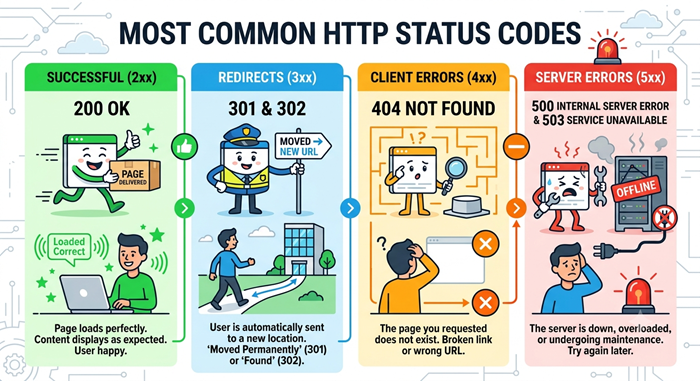
200: The Page Loaded Successfully
A 200 response generally means the requested resource was found and delivered successfully.
For most indexable pages, this is the expected result. However, a successful response alone does not guarantee that a page is useful, optimized, or eligible for search visibility.
A page can load perfectly while still having thin content, poor internal linking, or technical problems that limit its performance.
301: Permanent Redirect
A 301 response tells browsers and search engines that a URL has permanently moved to a new location.
This is commonly used when:
- A page URL changes
- A website migration takes place
- Multiple versions of a URL need consolidation
- An old page is replaced by a relevant new page
Redirects should point users to the closest relevant destination. Sending visitors to an unrelated page can create a poor experience and weaken the purpose of the redirect.
302: Temporary Redirect
A 302 response generally indicates that a URL has been temporarily moved.
This can be useful when a page is temporarily unavailable or when a short-term change is required. The important distinction is intent: permanent changes should normally use a permanent redirect, while temporary changes should remain temporary.
Using the wrong redirect type can create confusion during site migrations and URL management.
404: Page Not Found
A 404 response means the requested page could not be found.
Some missing pages are harmless, especially when users mistype a URL. Others are more important, particularly when a valuable page has been deleted without a suitable replacement.
Broken internal links can send users to unnecessary error pages. Regularly reviewing important URLs helps prevent avoidable frustration and protects the overall quality of the website.
410: Content Permanently Removed
A 410 response indicates that content has been intentionally and permanently removed.
It communicates a stronger message than a standard missing-page response. This can be useful when a page has been deliberately retired and there is no replacement available.
The correct choice depends on the situation, the page’s history, and whether a relevant alternative exists.
500: Internal Server Error
A 500 response indicates that something went wrong on the server.
Occasional errors may be temporary, but repeated failures can prevent visitors and search engine crawlers from accessing important content. Persistent server problems should be investigated quickly.
503: Service Unavailable
A 503 response tells visitors and crawlers that the service is temporarily unavailable.
This may occur during planned maintenance, temporary overload, or a short-term infrastructure problem. When used appropriately, it communicates that the issue is temporary rather than indicating that the page has permanently disappeared.
Why Status Codes Matter for Technical SEO
Search engines rely on server responses to understand how a website works. That makes status codes an important part of technical SEO.
When a crawler encounters a successful page, it can evaluate the content. When it encounters a redirect, it can follow the new destination. When it repeatedly encounters server failures, crawling may become more difficult.
This is why a technical SEO audit should examine more than rankings and keywords. It should also review redirects, broken URLs, server errors, crawl paths, and important pages that may be returning unexpected responses.
For businesses managing large websites, professional technical SEO services can help identify issues that are difficult to spot through manual browsing alone.
How Status Codes Affect User Experience
A website can have excellent content and still lose visitors because of technical problems.
A visitor who repeatedly encounters missing pages, confusing redirects, or server errors may leave before completing an important action. This can affect leads, sales, newsletter sign-ups, and overall trust.
Good website management aims to make every URL journey predictable. Visitors should reach the content they expect, and when a page is unavailable, they should receive a helpful alternative whenever possible.
Performance is another important part of the experience. If you are reviewing the relationship between speed and search performance, this guide on why site speed matters more than ever for seo success provides useful context.
The Connection Between Redirects and Website Architecture
Redirects are useful, but excessive or poorly managed redirects can create unnecessary complexity.
For example, a chain may send a visitor from an old URL to a second URL before finally reaching the correct page. This creates extra steps and can make crawling less efficient.
A cleaner approach is to redirect an outdated URL directly to the most relevant current destination whenever possible.
Website owners should also update internal links after major URL changes. Redirects can help preserve access, but direct internal linking creates a cleaner path for both users and crawlers.
If you are planning a new website or redesign, choosing web design packages with built-in technical seo can help technical considerations become part of the project from the beginning rather than an afterthought.
How to Check Status Codes on Your Website
You do not need to wait for a major SEO problem before reviewing your website responses.
Start by checking important pages, recently changed URLs, and pages that receive organic traffic. Look for unexpected redirects, missing pages, and server errors.
A broader review can also examine:
- Redirect chains and loops
- Broken internal links
- Important pages returning unexpected responses
- Old URLs from previous website versions
- XML sitemap URLs that no longer work
- External links pointing to unavailable pages
A structured review helps separate urgent issues from harmless technical noise.
Website owners who want a broader technical foundation can also explore technical seo tactics that support better crawling, indexing, and website performance.
Status Codes and Core Web Vitals
Server responses are only one part of the technical experience. A page can return a successful response and still provide a slow or frustrating experience.
That is where core web vitals become relevant. These performance measurements help evaluate how quickly content appears, how responsive a page feels, and how stable the layout remains while loading.
The best technical strategy considers both accessibility and performance. A page needs to be available, but it should also be fast and usable once visitors arrive.
A Practical Status Codes Checklist
Use this simple checklist when reviewing a website:
- Confirm important pages load successfully.
- Review redirects after URL changes or migrations.
- Fix broken internal links where appropriate.
- Check whether deleted pages have relevant replacements.
- Investigate repeated server errors.
- Review sitemap URLs for unexpected failures.
- Check important landing pages regularly.
- Monitor technical changes after redesigns.
- Keep redirect destinations relevant.
- Recheck major issues after fixes are implemented.
For businesses that need ongoing website support, working with a provider focused on unlimited web design can make continuous improvements easier to manage as the website grows.
Final Thoughts
A website’s technical health is built from many small details, and server responses are among the most important. The right response helps browsers, visitors, and search engines understand what to expect from every URL.
By monitoring status codes, managing redirects carefully, fixing important broken pages, and addressing recurring server problems, website owners can create a smoother experience and a stronger technical foundation.
The key is not to react only when a major error appears. Regular monitoring and thoughtful website maintenance can prevent many problems before they affect users, conversions, or organic visibility.
FAQs
What are status codes?
Status codes are three-digit server responses that explain what happened when a browser or search engine requested a URL.
Which status code means a page loaded successfully?
A 200 response generally indicates that the requested page or resource was successfully delivered.
Is a 404 error bad for SEO?
A 404 is not automatically harmful, but important pages with unnecessary broken links or missing content should be reviewed and fixed.
What is the difference between a 301 and 302 redirect?
A 301 usually indicates a permanent move, while a 302 generally indicates a temporary change.
How often should website status codes be checked?
Important URLs should be monitored regularly, especially after redesigns, migrations, URL changes, or major technical updates.