
 September 15, 2026
A successful website rarely starts with colors, animations, or polished visuals. It starts with a clear plan. Website wireframes help teams map out structure, content, navigation, and functionality before detailed design begins. When that foundation is strong, moving from an initial concept to the final interface becomes much easier for designers, developers, marketers, and business owners.
For businesses working with a professional design partner such as Ducky Unlimited, the goal is not simply to make a website look attractive. It is to create a practical digital experience that supports the product, business niche, audience, and conversion goals. A well-planned wireframe makes that process more organized and helps everyone understand what the finished website should accomplish.
Key Takeaways
- Website wireframes define page structure before visual design begins.
- A clear handoff reduces confusion between designers, developers, and stakeholders.
- Moving from structure to visual design works best through a documented, collaborative process.
- Strong planning helps Ducky Unlimited create attractive websites without sacrificing usability or business goals.
What Are Website Wireframes and Why Do They Matter?
Website wireframes are simplified layouts that show how information and interface elements will be arranged on a webpage. They usually focus on structure rather than colors, typography, imagery, or decorative details.
Think of a wireframe as the blueprint for a website. Before an architect chooses finishes for a building, the structure needs to make sense. The same principle applies to digital products.
A wireframe can show where the navigation sits, how a hero section is organized, where calls to action appear, how content is divided, and how users move from one section to another.
This makes website wireframes especially useful during the early stages of a project. Instead of debating visual details too soon, teams can concentrate on questions such as:
- What information should appear first?
- What action should visitors take?
- How should the page guide users?
- Which content deserves the most attention?
- Does the layout support the business objective?
That early clarity can prevent expensive changes later.
Website Wireframes vs. Final UI: What Is the Difference?
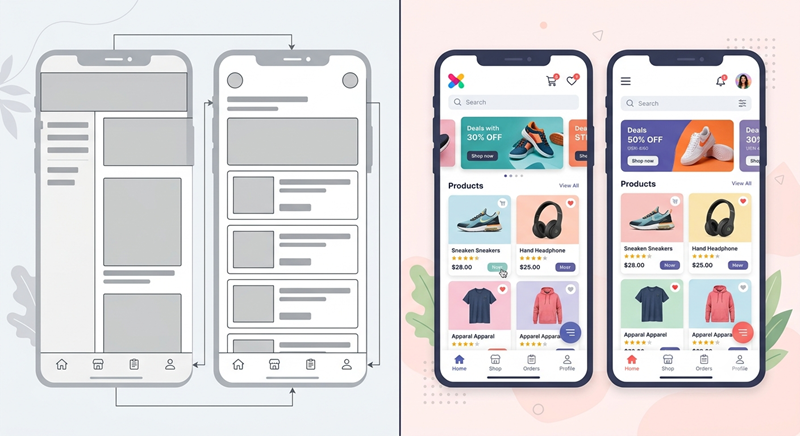
The biggest difference between website wireframes and a finished interface is the level of detail.
Wireframes concentrate on functionality and hierarchy. The final interface introduces the visual identity and interaction details that make the experience feel complete.
Wireframes Focus on Structure
Early website wireframes typically use simple shapes, placeholders, basic labels, and minimal styling. Their purpose is to communicate layout rather than create a finished visual experience.
At this stage, a designer can quickly change the position of a button, rearrange sections, remove unnecessary content, or rethink navigation without rebuilding an entire visual design.
Final UI Focuses on Experience and Appearance
The final interface brings the concept to life through typography, colors, spacing, imagery, icons, components, responsive behavior, and interaction patterns.
A strong ui/ux design approach connects these visual decisions to user needs instead of treating aesthetics as the only priority.
The transition from structure to polished interface should therefore be deliberate. A beautiful page with poor hierarchy can still create a frustrating experience.
How Website Wireframes Support Seamless Team Handoffs
Team handoffs often become difficult when a designer, developer, client, and project manager interpret the same concept differently.
Website wireframes reduce this problem by giving everyone a shared visual reference before production begins.
A developer can understand the expected page structure. A client can review the information hierarchy. A content team can see where copy belongs. A designer can refine the experience before committing to detailed visual treatments.
For teams exploring what are website wireframes in website design, understanding this planning stage is essential because wireframes create a bridge between an idea and a practical digital product.
The handoff becomes even smoother when each section has a clear purpose and important decisions are documented.
A Practical Wireframe to Final UI Design Process
The wireframe to final ui design process should not be treated as a single jump from rough sketches to finished screens. It works better as a series of controlled stages.
1. Understand the Product or Business
Ducky Unlimited begins with the purpose behind the website. An e-commerce brand, SaaS company, local service provider, and professional consultancy will all require different structures.
Audience expectations, conversion goals, brand positioning, content requirements, and technical considerations should influence the layout from the beginning.
2. Define the Page Hierarchy
Before designing individual components, the team should determine which pages and sections matter most.
A homepage might need a strong value proposition, supporting benefits, social proof, service information, and a clear call to action. A product page may require specifications, pricing, reviews, imagery, and purchase functionality.
The hierarchy gives website wireframes a strategic purpose instead of making them simple boxes on a screen.
3. Build the Initial Layout
At this stage, designers create the basic page structure. Navigation, content blocks, buttons, forms, images, and other important elements are positioned according to the agreed hierarchy.
Multiple website wireframes templates can be useful as starting references, but they should never replace customization. A template may provide a familiar structure, while the final layout should reflect the specific audience and business.
4. Review and Refine
Stakeholders should review the layout before visual design begins. This is the ideal time to question navigation, content priority, calls to action, and overall flow.
If something does not work, it can be changed quickly.
For teams wondering why wireframing plays such a critical role in product launches, this review stage is one of the biggest reasons. It allows teams to identify structural problems before they become development problems.
5. Develop the Visual Direction
Once the structure is approved, designers introduce branding and visual personality. Typography, colors, imagery, components, spacing, and interaction states begin to shape the interface.
This is where the project moves from a functional blueprint toward a polished final ui.
6. Prepare the Developer Handoff
A professional handoff should include approved screens, responsive considerations, component behavior, design specifications, assets, and notes where necessary.
The objective is simple: developers should not have to guess what the designer intended.
What Makes a Good Wireframe?
Good website wireframes are not necessarily complicated. In fact, excessive detail can make early concepts harder to review.
A useful wireframe should communicate:
- Page structure
- Content hierarchy
- Navigation
- Primary user actions
- Functional requirements
- Important responsive considerations
- Relationships between sections
It should also make decision-making easier.
Use Examples for Inspiration, Not Duplication
Reviewing website wireframes examples can help designers understand different approaches to navigation, content hierarchy, landing pages, dashboards, and conversion-focused layouts.
However, copying an existing structure without considering the project’s goals can create a generic experience.
Ducky Unlimited focuses on adapting design decisions to the product or business niche so the website feels intentional rather than assembled from disconnected patterns.
How Ducky Unlimited Creates Attractive Web Experiences
An attractive website needs more than a visually appealing homepage. It needs consistency, usability, speed, clear messaging, and a structure that supports the customer’s journey.
Ducky Unlimited combines strategic planning with creative execution to create digital experiences that are both visually engaging and practical. Businesses looking for unlimited web design can use this approach to maintain design flexibility while developing a stronger digital presence.
Visual assets also play an important role. For brands that need ongoing creative support, an unlimited graphic design subscription can help maintain consistency across website graphics, marketing materials, social content, and other brand touchpoints.
The result is a more connected design system rather than a website that looks attractive only on one page.
Why UI/UX Decisions Should Start Before Visual Design
Strong website wireframes encourage teams to solve usability problems before visual polish takes over the conversation.
For example, a designer might discover that a page contains too many competing calls to action. Another review may reveal that important information is buried too far down the page.
These problems are easier to solve during structural planning.
Teams can also explore UI/UX secrets for attract visitors to better understand how interface decisions can influence engagement and user behavior.
Good UX is not about adding more features. It is about making important actions understandable and reducing unnecessary friction.
Common Mistakes to Avoid
Even experienced teams can make mistakes when planning a website.
Designing Too Much Too Early
Adding colors, imagery, animations, and detailed components to early website wireframes can distract stakeholders from structural problems.
Ignoring Mobile Layouts
A desktop-first structure that does not adapt properly can create serious usability problems. Responsive behavior should be considered before the design is finalized.
Also Read: Mobile-First Indexing
Treating the Handoff as an Afterthought
A designer may understand every decision behind a screen, but the developer may not have that context. Clear documentation and organized files make implementation much more reliable.
Prioritizing Looks Over Goals
A visually impressive interface still needs to support the user’s journey and the business objective. Design decisions should always have a reason.
Understanding Web Design Costs
Project budgets can vary significantly depending on scope, complexity, research, functionality, number of pages, revisions, and the level of design support required.
Businesses sometimes compare web design rates without considering what is actually included in the service. A lower initial quote may not include strategy, responsive design, revisions, development support, or ongoing creative requirements.
Likewise, comparing web design rates per hour alone does not necessarily reveal the overall value of a project.
A better approach is to evaluate the complete workflow, deliverables, communication process, and expected business outcome.
How Better Wireframes Lead to Better Results
The real value of website wireframes becomes clear when they reduce uncertainty.
When everyone understands the page structure, feedback becomes more specific. Designers can focus on experience. Developers receive clearer requirements. Clients can approve decisions earlier.
This creates a more predictable path toward the finished website.
Well-planned website wireframes also make iteration easier. Instead of rebuilding detailed screens whenever a structural issue appears, teams can address the problem while changes are still relatively inexpensive.
That is particularly valuable for businesses launching new products or improving an existing website.
Final Thoughts
Website wireframes provide the foundation for a smoother design and development workflow. They help teams focus on structure, usability, content hierarchy, and business goals before visual details become the center of attention.
The best process is not about choosing wireframes or polished design as competing approaches. It is about using each at the right stage.
With thoughtful planning, clear reviews, and a structured handoff, Ducky Unlimited can turn an initial concept into an attractive digital experience that fits the product, business niche, and audience.
When website wireframes are treated as a strategic part of the project rather than a quick preliminary step, the entire journey from concept to launch becomes more focused and efficient.
Frequently Asked Questions
1. What is the purpose of a website wireframe?
A website wireframe maps page structure, content hierarchy, navigation, and key actions before detailed design begins.
2. Should wireframes include colors and images?
Usually, early wireframes remain simple so teams can focus on structure and usability rather than visual styling.
3. Who should review a wireframe?
Designers, developers, stakeholders, content teams, and relevant business decision-makers can review it before final design begins.
4. Can wireframes improve the development handoff?
Yes, clear wireframes give developers a shared reference for understanding page structure and intended functionality.
5. Are wireframes necessary for every website?
They are especially valuable for projects with complex layouts, multiple stakeholders, custom functionality, or significant user-flow requirements.